Timing Sessions
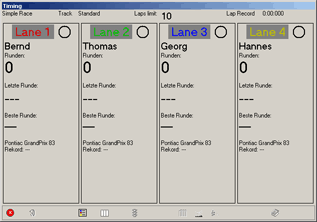
This window is displayed during a timing session. It contains:
Mode
In this version of Slotman the timing modes practiceOE1CEF , simple raceE.NCM0 , elimination race21DW3B8 and club raceRQMC7O are available.
Track
The name of the track.
Time-/Lap limit
If a time- or lap-limit has been configured, the corresponding information is displayed. If the race is limited by time, the time left is being updated as configured in the dialog timing options2Y73VN .
Lap record
Displays the absolute track record on this track. If no time has been recorded so far, 0:00:000 is displayed.
For each track the information about driver, car etc. is displayed along with the last lap time and the best lap time recorded with the given configuration.
Note that the actual content of the lane information can be configured to display the information you need.
The race is started by confirming the “Ready”-Message. More information about the starting procedure may be found here2Y73VN.
The timing/lap counting is done until the predefined time has expired or the preset number of laps have been completed. During the session the leading driver´s lane information is highlighted.
The timing may be stopped by pressing “Esc”.
When the timing has ended, the best lap times are saved. This may take several seconds to complete.
When saving the best lap times, the lane´s configuration is taken into account. If the maximum of lap times has been recorded for a track already, the configuration with most saved lap times is determined. The slower half of these laps are deleted to make way for the new fastest laps. This is done automatically. This way the fastest laps for all configurations are saved.
If at least the number of laps configured as the minimum for averages in the timing options2Y73VN dialog have been completed, the average time on this lane is being saved as well.
Apart from that the last event´s result is saved. The last results from each track can be recalled later.
Note that the number of saved results per track is limited. If the maximum number of results have been saved, the first one is deleted. This way the latest events are stored.
The buttons on the bottom of the dialog may be used during or after the session for calling further functions and options. Not all of them are available in all racing modes and during and after the session.
Break

Use this button to end the session.
Close

Closes the dialog.
Repeat

After the end of a practice or simple race session this button is active. This function can be used for restarting the session without having to use the main menu functions.
Standings

Use this button to show or hide the additional standings window.
Lane setup

While being in practice mode, you can change the lane configurations by using the button “Lanes”. Timing goes on on all lanes while configuring. If the configuration of at least one lane has been changed, the practice for these lane(s) is restarted and the total number of laps completed on this lane is output in brackets after the display of the number of laps. The fastest laps for the previous configuration(s) are saved. Please note that there are only a maximum of 10 lap tables available at the end of the session and that the result saved only contains the lanes active at the end of the session.
In practice mode there´s also a possibility to reset the information about fastest lap times etc. for each lane by pressing Shift + F5-F12.
Configuration

After the session the timing parametersIDH_managetiming may be changed. Only the timing session window´s size cannot be altered.
Lane colors

Use this option to change lane colours for future sessions.
Fastest laps

Opens the dialog for analysing the fastest laps10KJFMO.
Lap tables

Opens the dialog for analyzing the laptimes of the last sessionF1.N_P.
Results

Opens the result dialogG92AOQ.
Created with the Personal Edition of HelpNDoc: Produce online help for Qt applications