Club Race
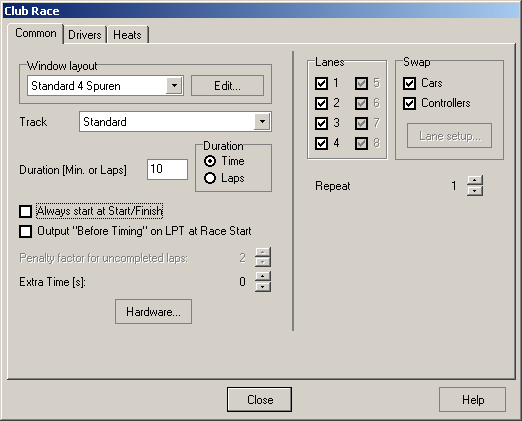
A Club Race consists of several runs. Each driver enters a race on each lane. The driver being fastest when adding all races wins.
There are the following options to configure a club race:
Duration
This decides about the duration of the heats (laps or time). The value given is used for each race. This is not the duration of ALL races when added !
Example: 6 drivers, 4 lanes: 6 Runs: If the duration of all races should be about one hour when added, these parameters must be set to “Time” and 10 (minutes). Please also note the “Repeat” option (see below). The total number of heats is shown in the lower left of the dialog.
Is the run is limited to laps, the run is ended when all drivers have completed the whole distance. If the duration is limited to time, it is ended immediately after the time has expired.
Always start at Start/Finish
This option is only available if the heat-duration is set to “Time”.
If this option is chosen, the first crossing of the Start/Finish line is ignored (no lap is counted). Hence if the heats are organized the way that the cars are left wherever they stopped after the end of a heat and the next heat is started from those places, this option should be chosen.
This also means that choosing this option only makes sense if the track power is controled via the LPT-output and there are no more drivers than lanes.
Output „Before Timing“ on LPT at Race Start
This option only is available if the beforementioned option is NOT chosen. If heats are not started from Start/Finish, it might be usefull (depending on the configuration) to output the LPT-signal “Before Timing” in the very moment, the heat is started.
Penalty factor for uncompleted laps
If a club race is cancelled and not terminated normally, all drivers that haven´t completed the preset number of laps get a time penalty. Use this option to determine the amount of this penalty. For each missing lap the lap record is multiplied by this factor and the result is assigned as the lap time. So for a factor of e.g. 2 the lap record is doubled and the result is used as a penalty for each missing lap.
Extra Time [s]
Here you can define the amount of time in which input signals are accepted AFTER the session has already ended. This is only useful if you have configured a signal to the parallel port after race end which turns off track power. So cars that slide over the start/finish line when the power is already off are accepted. The extra time only applies for races that are limited by time. It is also used for the beginning of track call periods.
Track
The track on which the club race takes place. If the race has been started from within the track layout editor, the current track is preset here. Otherwise the last used track is preset.
Hardware
This button opens the dialog Timing Options2Y73VN.
Window Layout
Choose the desired window layout here or open the dialog Timing Window Layout Setup5D3UIV by clicking “Edit”. The window layout last used for a practice session is preset.
Lanes
Use these options to turn lanes on or off. Lanes turned off are not used in the Club Race.
Swap
Cars (and their tyres, magnet setups etc.) and controllers may be assigned to lanes. To do so, turn off the corresponding options. The assignment of cars and controllers to lanes may then be done by clicking “Lane setup.”
If the options are turned on, cars, car-relevant information (like tyres etc.) and controllers are assigned to the driver and so are swaped between lanes when the drivers change lanes.
Repeat
The whole series of heats may be repeated several times. All heats are used for the calculation of the results. The number of heats increases and the whole Club Race will take longer to complete.
Drivers/Participants
The drivers list displays all stored drivers that do NOT participate in the club race. The participants are listed on the right side. The drivers may be exchanged using the buttons in between the lists. If a driver is selected in one of the lists, the parameters for this driver (car etc.) may be set up on the right side of the dialog.
These lane-setups may be saved to be able to reuse them in further races. Saved configurations for lanes may be recalled from the bottom of the dialog. The “E”-button opens the Lane Configuration DialogH7RFP_.
Please note that the setup lists are unavailable if the parameters „Cars“ and „Controllers“ are unchecked in the „Swap“ option. As mentioned above the cars and controllers are assigned to the lanes directly instead of the drivers.
Track voltage is always assigned to the driver.
Heats
This page lists the lane assignment for each heat. The sequence may be changed by selecting one or more heat(s) and clicking one of the arrow-buttons in the lower right area of the dialog. There´s also an option available to select all heats with a specific participant. These heats can be moved together. This is a simple way of racing all heats with a specific driver before all others.
Race...
Use this button to start the heat currently selected in the list.
Next Race...
This starts the first heat that hasn´t been completed so far.
Click “Close” to close the dialog without any further action.
Before each run the lane table is displayed. You cannot make changes to the data displayed because it´s calculated automatically. Clicking “Cancel” ends the club race without saving a result for it. Pressing “OK” starts the race.
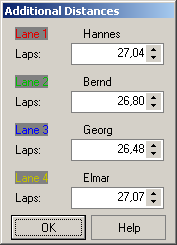
If the runs are limited by time an heats are started from the Start/Finish line, the user has to input the distance the car has travelled since the last passing of the finish line (in 1/100 of a lap). For this task to complete, a special dialog is displayed. The values displayed are pre-calculated and may be changed. This also allows changing the number of completed laps to correct falsely triggered signals because of accidents etc.
The next display displays the current standings. For better comparison the drivers are ordered by the driver´s average performance of the drivers in their completed heats.
Note: When the heats are limited by time, the average values for laps and meters for a driver may be smaller then the ones for a driver listed after him. This is caused by rounding inaccuracy when the list is output. However, the sequence is correct.
The following buttons may be used:
Repeat: Click this button to repeat the last race. The result of the last race is annulled.
Cancel: Stops the club race. No result is being saved.
Close: Closes the dialog and displays the Heats-Table again if the last heat hasn´t been completed. The functions for reordering the heats are available, also.
Created with the Personal Edition of HelpNDoc: Easily create Help documents