Practice
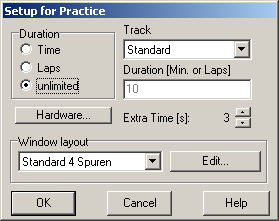
This is the simplest timing mode. The following dialog presents the options for the practice mode:
Duration
This option is for setting the duration of the training. This limit may be a time or lap-limit. The training lasts for the amount of time (or laps) given in the field below (or until the Esc.Key is pressed). The option “unlimited” makes the training last for an (almost) unlimited time.
Track
The track where the training takes place. If the training has been started from within the track layout editor, the current track is preset here. Otherwise the last used track is preset.
Hardware
This button opens the dialog Timing Options2Y73VN.
Extra Time [s]
Here you can define the amount of time in which input signals are accepted AFTER the session has already ended. This is only useful if you have configured a signal to the parallel port after race end which turns off track power. So cars that slide over the start/finish line when the power is already off are accepted. The extra time only applies for races that are limited by time. It is also used for the beginning of track call periods.
Window Layout
Choose the desired window layout here or open the dialog Timing Window Layout Setup5D3UIV by clicking “Edit”. The window layout last used for a practice session is preset.
Click “Cancel” to close the dialog without any further action or “OK” to enter the lane setup1DBRIVW.
Created with the Personal Edition of HelpNDoc: Free Kindle producer