Elimination Race
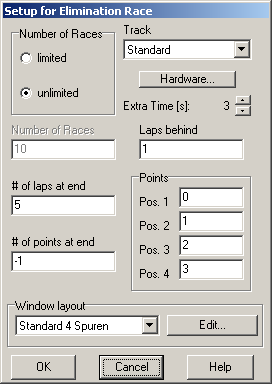
The rules for the elimination race are as follows:
A run is started limited neither by a specified number of laps nor by time. The drivers´ target is to stay in lead lap (and not to spin off) as long as possible. The first to retire is the last of this run, the second is last but one etc. To avoid drivers going too slow, you can configure how many laps a driver may be down before he is disqualified. This is the only way to determine if a driver is eliminated. If the drivers spins off the track, the car could be inserted into the slot again and SlotMan couldn´t notice that. But most likely this would cost at least one lap.
If to drivers are eliminated in the same lap, the ranking at the last lap is used to determine positions. If there are only two drivers left (or if the run has been started with only two drivers), the set number of laps are run. The last driver in the race wins (or the one that´s in front when the set number of laps have been completed).
The drivers are awarded points for each run. The better the position, the less points the driver gets. The last two drivers can be rewarded extra points (to subtract) for having completed the run.
The number of runs equals the number of drivers (max. 8). The points are added and the current standings are displayed between the runs. Runs may be annulled to respond to unfair bumps etc.
If a driver can´t be reached theoretically before the last run, this run isn´t started anymore.
On the other hand there may be equal points after the last run. In this case, another run is started.
This procedure can be repeated over and over again. If the number of races in set to 10 and 4 lanes are used, 40 runs are being started (depending on the above conditions).
The options in detail:
Number of Races
Choose whether the number of races is limited to the number given in the field below or unlimited. For each race there will be (about) the same number of races as there are drivers.
Track
The track on which the elimination race takes place. If the race has been started from within the track layout editor, the current track is preset here. Otherwise the last used track is preset.
Hardware
This button opens the dialog Timing Options2Y73VN.
Extra Time [s]
Here you can define the amount of time in which input signals are accepted AFTER the session has already ended. This is only useful if you have configured a signal to the parallel port after race end which turns off track power. So cars that slide over the start/finish line when the power is already off are accepted. The extra time only applies for races that are limited by time. It is also used for the beginning of track call periods.
Laps behind
This options decides when a driver going too slow is eliminated. It is recommended to leave this to the default value (1) to avoid drivers going too slow.
# of laps at end
Configures the number of laps the last two drivers have to go after all other drivers have been eliminated.
Points
Use this to award points for each position. Note that points have to be ascending, that means that the winner gets the least.
# of points at end
If the last two drivers are able to complete the laps given in “# of laps at end” after the other drivers have been eliminated, they can be awarded additional points (to subtract).
Window Layout
Choose the desired window layout here or open the dialog Timing Window Layout Setup5D3UIV by clicking “Edit”. The window layout last used for a practice session is preset.
Click “Cancel” to close the dialog without any further action or “OK” to enter the lane setup1DBRIVW.
Created with the Personal Edition of HelpNDoc: Free help authoring tool