Championships
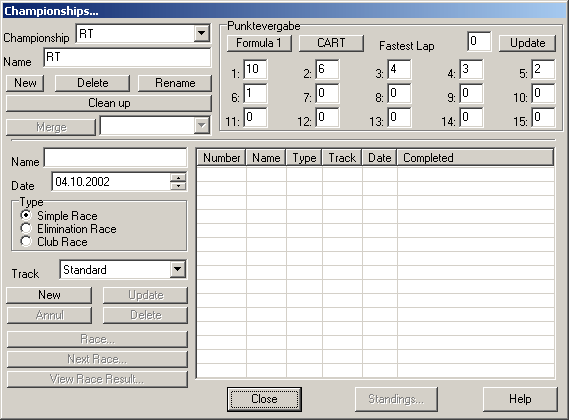
Use this dialog to configure championships and start races.
Championships may consist of a maximum of 99 races. These races may be run over a long period of time. The results are saved in the slotman.dat-file and another race may be started in a later SlotMan-Session.
You can configure several independent championships which can be used in parallel.
The following timing modes are supported:
• Simple RaceE.NCM0
• Elimination Race21DW3B8
• Club RaceRQMC7O
The upper part of the dialog is used to manage the championships. The lower part contains information about the races set up for the current championship.
Championship
Used to choose the current championship. All other parts of the dialog now relate to this championship.
Name
This is the championship´s name.
New
Creates a new championship using the name given in the corresponding field.
Delete
Deletes the current championship. WARNING: This cannot be undone !
Rename
Renames the current championship to the name given in the corresponding field.
Clean up
This function removes all races from the current championship that haven´t been completed so far.
Merge
All races from another championship are moved into the current championship. The championship to copy the races from is selected from the list to the right of this button. This championship is being deleted after the races have been copied.
Points
Point configuration for each position. Note that the points awarded are in descending order, the winner gets the most. Clicking “Formula 1” or “CART” fills the fields to reflect the points-systems of these series. There are additional options for awarding points for the fastest lap (simple race only).
This part of the dialog is available only if there has been no race completed for the current championship since it wouldn´t make sense to change the point-system in “mid-season”.
The controls to setup the races of the current championship can be found in the lower part of the dialog:
Name
The name of the race. The name is handled as a short description.
Date
The date of the race as scheduled. The date is automatically updated when the race is run.
Type
The race mode.
Track
The track layout where the race takes place.
New
Creates a new race with the above parameters. The race is listed on the right of the dialog.
Delete
Deletes a previously input race. You can also delete a race that already took place. Of course this would influence the current championship standings.
Update
Use this button to update the race´s parameters according to the options set. This cannot be done if the race has already taken place.
Annul
Marks the currently selected race as not completed.
Race
The race described by the current parameters is started. First the corresponding dialogs like lane setups etc. are displayed.
Next Race
This button starts the race that has not taken place and is listed topmost in the race list. Races don´t have to be run in the listed order.
View Race Result
Use this function to display the result of the currently selected race.
Close
Closes the dialog.
Standings...
Opens another dialog which displays the current championship standings. There is no explicit end to a championship, that means you can add races as long as the current limit (99 races) isn´t exceeded.
Created with the Personal Edition of HelpNDoc: Full-featured EPub generator