Lane Presets
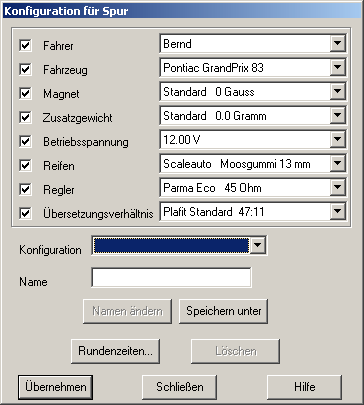
Use this dialog to edit the most frequently used lane setups to save them for future use. A configuration holds information about what driver uses what car driving what controller etc. (upper part of the dialog). Apart from that you can configure if the corresponding data is to be used.
Example:
If a car is always used with the same setup (car, magnet, trim weight, voltage, tyres and gear ratio), you can configure these options accordingly. But it´s likely that the car is run using different controllers and (even more likely) by different drivers. So these two parameters should be deactivated using the switches on the left side.
The completed configuration may then be used in the lane setup1DBRIVW and the club raceRQMC7O dialog. In the above example the defined entries for driver and controller would not be overwritten. If the configuration is used from the club race, the driver is never overwritten because this information is already provided when using the club race dialog.
Configuration
The list contains all previously defined configuration. These can be selected and modified.
Change Name
Use this function to rename the currently selected configuration. The new name is taken from the field “Name”.
Save as
Creates a new configuration. The name is taken from the field “Name”.
Delete
Deletes the current configuration.
OK
Closes the dialog.
Apply
Closes the dialog. Apart from that the current configuration is applied to the lane the dialog has been started from. When started from the club race dialog, the corresponding controls in the club race dialog are updated.
Created with the Personal Edition of HelpNDoc: Free Web Help generator