

13th-Dec-19, 11:51 PM
Hello,
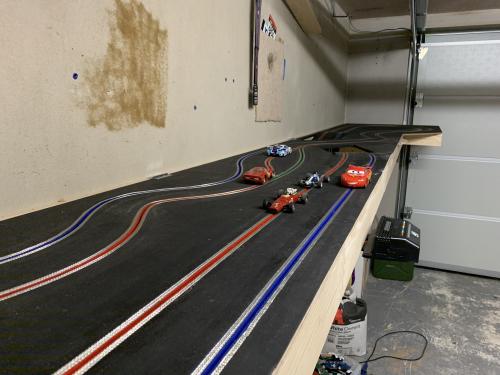
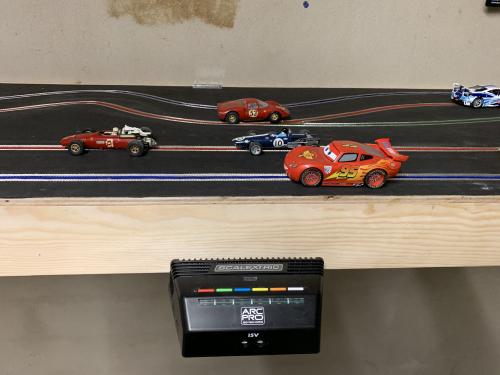
I've just built this track and connected it all using Scalextric Arc Pro, it's all coming together nicely and has been a few hours of work routing the slots, braiding, wiring etc. I used to have a wooden routed track back in the early 1990s as a teenager and I thought I'd do a modern version with all the tools and digital stuff which was either not around in the 90s or just too expensive. Many of the cars are 1960s vintage that are my father's from his childhood, they might not be the fastest but they just run better than modern cars on wooden tracks.
Can anyone make any suggestions on a small problem I'm experiencing? The track works in both analogue and digital modes but won't recognise the digital cars at the point of set-up just before a practice or race, the app says to place the car on lane 1 but the app doesn't ever recognise the car. I'm wondering if there is some specific height I've got to get the base unit to so that it's closer to the track surface as in when it's hooked up to the standard scalextric start / finish line. I've wired up the sensors on the underside of the track and I'm pretty sure they are good to go.


Cheers
Dave
I've just built this track and connected it all using Scalextric Arc Pro, it's all coming together nicely and has been a few hours of work routing the slots, braiding, wiring etc. I used to have a wooden routed track back in the early 1990s as a teenager and I thought I'd do a modern version with all the tools and digital stuff which was either not around in the 90s or just too expensive. Many of the cars are 1960s vintage that are my father's from his childhood, they might not be the fastest but they just run better than modern cars on wooden tracks.
Can anyone make any suggestions on a small problem I'm experiencing? The track works in both analogue and digital modes but won't recognise the digital cars at the point of set-up just before a practice or race, the app says to place the car on lane 1 but the app doesn't ever recognise the car. I'm wondering if there is some specific height I've got to get the base unit to so that it's closer to the track surface as in when it's hooked up to the standard scalextric start / finish line. I've wired up the sensors on the underside of the track and I'm pretty sure they are good to go.
Cheers
Dave
![[+]](https://slotracer.online/community/images/bootbb/collapse_collapsed.png)


