

31st-Dec-25, 06:48 PM
Before he sadly passed away, Pierrick Guillard-Prevert, the creator of Ultimate Racer, was working on a new version of the software. Actually his vision was so ambitious that it would have been something totally new, rather than a version of UR. The aim was to create a fully 3d capable, cross platform track designer.
But progress was slow, potential avenues to explore were blocked after promising starts, and Pierrick became frustrated. There was potential, but I never saw anything that felt as if it even approached a finished product.
A year or so ago, it occured to me that there was already a piece of 3d software which was free, and cross platform, namely Blender. Obviously it was hugely over qualified for the job, but I wondered if, with Pierrick's coding skills, we might be able to simplify it enough for practical use. I set out to test a few things, but stalled on some of the basics before I'd even mentioned the idea. I have most of a useable Scalectric 3d library, but simplifying the user interface, and getting the track pieces to reliably snap together have proved difficult. I haven't given up on it yet, but I am feeling it may be less likely now.
However, I have been doing some experiments on a Blender based, routed track designer, and progress here has thankfully been rapid.
Below you can see the results of using an array modifier, which allows a small piece of 3D track to be extended, following a curve, to make a complete track, in this case a three lane layout with 10cm lane widths and borders.


The control points on the curve allow you to change the shape of the track more or less instantly, and really simply. You can see the changes in the track as you work, and the automatic smoothing means you can get a track design together very, very quickly.

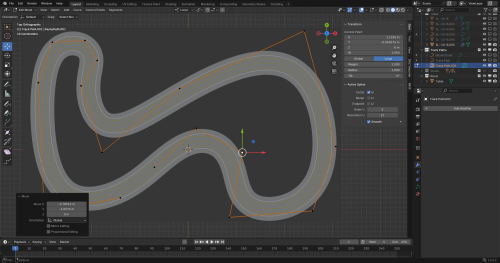
Of course you can add more control points, delete them, or change type for finer control, as you'd expect with Blender. But I think these work fine.
There are a couple of complications...
Firstly, the array modifier can't automatically change its length, so there is some tweaking required to make sure the track joins up without overlapping.
And secondly there is a strange problem with rendering whilst the array modifier is active, as you'll see below. This is easily fixed, but the fix prevents you from editing, so you have to make a copy, in case you want to edit further.

Finally, it looks as if elevations may be possible, though that will need more investigation to see if it works reliably.

Fixing the two slight complications would be a bonus, but probably aren't possible. Even as it is though, it's great, so user friendly and easy, though a basic familiarity with Blender is necessary
My intention is to draw up a comprehensive list of track pieces, in a range of lane numbers and widths, and then make it available.
But progress was slow, potential avenues to explore were blocked after promising starts, and Pierrick became frustrated. There was potential, but I never saw anything that felt as if it even approached a finished product.
A year or so ago, it occured to me that there was already a piece of 3d software which was free, and cross platform, namely Blender. Obviously it was hugely over qualified for the job, but I wondered if, with Pierrick's coding skills, we might be able to simplify it enough for practical use. I set out to test a few things, but stalled on some of the basics before I'd even mentioned the idea. I have most of a useable Scalectric 3d library, but simplifying the user interface, and getting the track pieces to reliably snap together have proved difficult. I haven't given up on it yet, but I am feeling it may be less likely now.
However, I have been doing some experiments on a Blender based, routed track designer, and progress here has thankfully been rapid.
Below you can see the results of using an array modifier, which allows a small piece of 3D track to be extended, following a curve, to make a complete track, in this case a three lane layout with 10cm lane widths and borders.
The control points on the curve allow you to change the shape of the track more or less instantly, and really simply. You can see the changes in the track as you work, and the automatic smoothing means you can get a track design together very, very quickly.
Of course you can add more control points, delete them, or change type for finer control, as you'd expect with Blender. But I think these work fine.
There are a couple of complications...
Firstly, the array modifier can't automatically change its length, so there is some tweaking required to make sure the track joins up without overlapping.
And secondly there is a strange problem with rendering whilst the array modifier is active, as you'll see below. This is easily fixed, but the fix prevents you from editing, so you have to make a copy, in case you want to edit further.
Finally, it looks as if elevations may be possible, though that will need more investigation to see if it works reliably.
Fixing the two slight complications would be a bonus, but probably aren't possible. Even as it is though, it's great, so user friendly and easy, though a basic familiarity with Blender is necessary
My intention is to draw up a comprehensive list of track pieces, in a range of lane numbers and widths, and then make it available.
![[+]](https://slotracer.online/community/images/bootbb/collapse_collapsed.png)


