Sound Setup
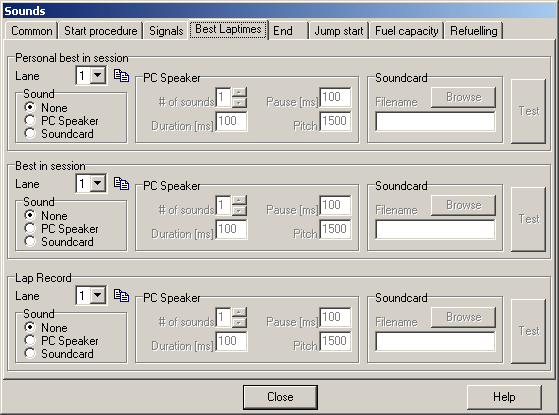
Each event in a timing session can be a sound assigned to. This can be done for each lane independently. This sound may be configured to be generated by the PC-speaker or a soundcard (.wav-file).
Multiple sound setups may be defined and used. These setups may be exported and imported to be shared between multiple users.
Common
Here new setups can be created, existing setups may be renamed or deleted. Apart from that setups can be exported and imported via the corresponding buttons.
The remaining pages contain the configuration itself:
Lane
All configurations defined in the corresponding groups are used for this lane only. Configurations may be copied to other lanes using the “>>”-button.
Sound
This defines if the sound is to be played by the PC-speaker or the soundcard. Soundcards can playback standard Windows-wav-files.
PC-Speaker
These options configure the sound generated by the PC-Speaker.
# of sounds
This option defines how many sounds should be played. Duration and frequency are defined for all of these sounds in common.
Duration[ms]
Duration of the sound.
Pause[ms]
If there are more than one sound to be played, this parameter contains the length of the pause between the sounds.
Pitch
The sound´s frequency.
Soundcard
These options define the .WAV-file to be played. Note that the file must be stored in the same folder as the SlotMan executable.
If the file can´t be played back, a sound on the PC-Speaker is generated.
Test
Use this button to test the current configuration.
Created with the Personal Edition of HelpNDoc: What is a Help Authoring tool?