Racecontrol Sensorbox
Racecontrol
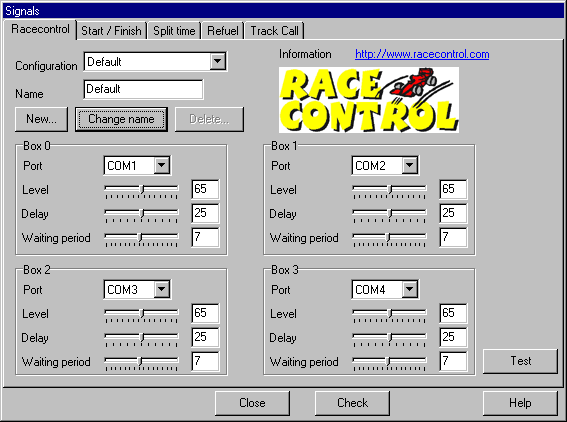
This dialog is used to setup the used signals for the timing functions. There are signals for start/finish, split times, refuel option and track calls (pause). You can setup several configurations (e.g. for 2 and 4 lanes).
The “Check”-function on the lower dialog border is used to check the configuration for conflicts. As an example it does not make sense to use the same signal for the start/finish line of one lane and as a split time trigger for another lane.
It is highly recommended to use this function after the configuration is done to avoid inconsistent configurations.
Configuration
Use this option to choose the current configuration to use. All other options in this dialog apply to the configuration chosen here.
Name
This name is used for a new configuration (when using “New” below) or to rename the current configuration (“Change name”).
New
This creates a new configuration as a copy of the current one naming it according to the Name-field.
Change name
Renames the current configuration according to the Name-field.
Box
Slotman supports up to 4 Racecontrol Sensorboxes simultaneously. The parameters for each box can be set up independently.
Level: The larger this number, the smaller signals the box detects. This should be left to a medium value unless you´re using the refuel functionality. In this case you would set this value to the maximum-
Delay and waiting period: These parameters are used to avoid signals with just very short periods between them. This is also done by the software, so these options don´t have to be altered normally.
For more information regarding the box see the Racecontrol manual.
The button “Test” sends the new setup to the boxes.
Start/Finish
Here you can define which sensor is used for each lane. Use the configuration as follows:
Click the “Browse”-buttons one after the other and drag a car over the corresponding sensor.
Note that if split times and/or refuelling are to be triggered by Racecontrol sensors, you´ll have to use sensors of the same box as configured for the start/finish line.
Split time
On this page the signals for split times are set up. The configuration is similar to the one for the start/finish line with the following extra options:
Slotman supports up to three split times per lane (four sector times). Choose the current split time from the top of the dialog.
For split times (and signals for the refuel option) signals from the parallel port and gameport are supported.
If you´re using signals from the Racecontrol box, the same box as for the start/finish line signal on this lane has to be used.
For each split time and lane the distance to the previous split time on the track has to be input. This information is used to calculate sector speeds.
Refuel
This page is used to setup the signals for refuelling. Refuelling supports one or two signals. If only one signal is used, refuelling takes place when the car is “parked” on the sensor. If two signals are used, refuelling takes place when the car is standing between these two signal points. This setup should be used in the following situations:
- Racecontrol sensors are to be used for refuelling. These sensors are built to ignore static signals.
- If any kind of sensors inside the slot are to be used. These are only triggered by the car´s guide and this makes parking on the sensor quite difficult.
- When using HO-Cars since these cars may also be difficult to park on sensors because of their smaller size.
Track Calls
These options are used to setup the signals used for pausing races. Only signals from the parallel port or gameport are supported. The race can be paused by any lane. The information about which lane has caused the pause is not used in this Slotman-version. This will be implemented in future releases of the software. Optionally the pause can be triggered via the F5-F12- keys.
Created with the Personal Edition of HelpNDoc: Benefits of a Help Authoring Tool