Output Signals to LPT
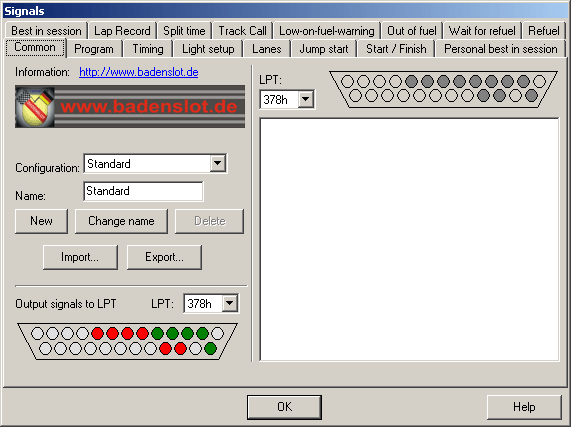
Use this dialog to configure signals for various events during a timing session to output on the PC´s parallel port. These signals may be used for external starting lights, power control or similar electronic devices.
Common
Configuration
Here you can choose the currently used configuration. There may be more than one configuration (e.g. for 2 or 4 lane use). To create a new configuration, enter the name in the corresponding field and press “New”. The new configuration now consists of all the settings of the previously selected configuration.
The current configuration may be renamed by typing in the new name and pressing „Rename“.
The configuration can also be deleted but note that at least one configuration must remain.
Use the „Export...“-button to write the current configuration to disc. This way configurations may be shared amongst Slotman-Users. This file may then be read using the „Import...“ button.
Output Signals
The lower left part of the dialog can be used to write to the parallel ports directly. This is implemented for testing purposes only. The signal may be changed_KAVP0 by clicking the port diagram display. The signal is set for the preset port.
Report
On the right side of the dialog a report functionality is provided. When clicking the pins in the port diagram a text reporting the signals this pin is used for is output to the text area on the lower half. This function should be used to avoid errors in the signal setup.
Signals for the following events may be configured. The signal setup is changed by clicking the port diagram display. Green pins mean cleared signals, red means the signal is set and unchanged pins are displayed in yellow. The signal output may be switched on and off for each event individually. The currently used signal setup may be output by pressing the “Test”-button. WARNING: Signals to pins 14 and 17 are hardware-inverted by the parallel port !:
Tab |
Signal |
Output at |
Comment |
Program |
Program start |
Just after the slotman.dat – file has been loaded at program startup |
May be output to 3 ports independently |
Program |
Program end |
This is the last action before the program terminates |
May be output to 3 ports independently |
Timing |
Before timing |
When the timing dialog is opened |
May be output to 3 ports independently |
Timing |
After timing |
When the timing dialog is closed |
May be output to 3 ports independently |
Timing |
Race start |
When the race is started |
May be output to 3 ports independently |
Timing |
Race end |
When the race is terminated (when the race is limited by time without any extra time) |
May be output to 3 ports independently |
Light setup |
When the corresponding starting light is being switched on or off |
The number of starting lights to use may be changed in the timing setup dialog. |
|
Lanes |
This signal is on while the corresponding lane accepts any incoming signals. So they are set just before the starting lights. |
||
Jump start |
When a jump start is detected on the corresponding lane. The signal is cleared when the penalty time for jump starts has passed. |
This is only active if the jump start setup in the timing configuration dialog is set to output signals. The penalty time is also setup in this dialog. |
|
Start/Finish |
When the car passes the start/finish line. |
The signal duration in ms may be setup for this event. |
|
Personal best in session |
When the laptime has been the best one for this lane during this session. |
The signal duration in ms may be setup for this event. |
|
Best in session |
When the laptime has been the best one during this session. |
The signal duration in ms may be setup for this event. |
|
Lap record |
When the laptime has been better than the track record before this session. |
The signal duration in ms may be setup for this event. |
|
Split time |
When the car passes the split time setup on the left of the dialog. |
The signal duration in ms may be setup for this event. |
|
Track Call |
Start |
When the timing session is paused |
May be output to 3 ports independently |
Track Call |
End |
When the timing session is resumed (started again). |
May be output to 3 ports independently |
Low-on-fuel-warning |
As long as the fuel level for the corresponding lane is critically low. |
||
Out of fuel |
When the fuel level of the corresponding lane is zero. The signal is cleared when the penalty for empty fuel has passed. |
This is only active if the out of fuel setup in the timing configuration dialog is set to output signals. The penalty time is also setup in this dialog. |
|
Wait for refuel |
While the car on the corresponding lane is waiting for the refuel to start. |
The time the car has to wait is setup in the timing setup dialog. |
|
Refuel |
While the car on the corresponding lane is being refuelled. |
Created with the Personal Edition of HelpNDoc: Free Web Help generator