Signal Configuration LPT
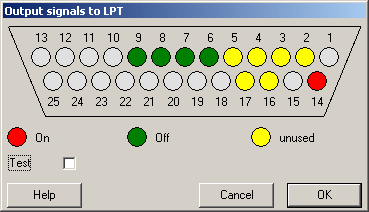
In this dialog you can setup the signal to output on the parallel port. The configuration is handled through the display of the port on the upper edge of the dialog. The status of each pin can be altered by clicking it. The pin is then assigned one of the following states:
Green: no signal
Red: Signal set
Yellow: unchanged
Pins that cannot be used for configuration are drawn grey.
If the test-option in the lower part of the dialog is checked, the current signal configuration is automatically output to the port after each change.
Use „OK“ to accept the changes or „Cancel“ to remove them.
Please note that the signal on pins 14 & 17 are inverted by the PCs parallel port hardware. Therefore the display of these pins in the configuration dialogs is inverted as well.
Created with the Personal Edition of HelpNDoc: Full-featured multi-format Help generator