Display Style
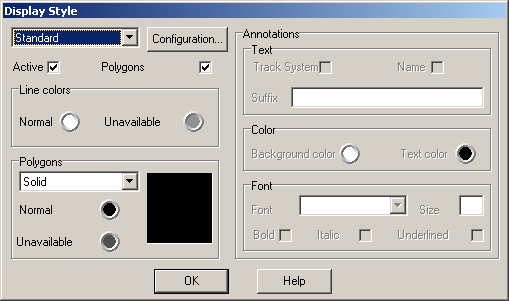
In this dialog the display for the varying section types can be configured independently. This way you can distinguish the sections by colour, filling style or annotations. This configuration may be don e for each Display Configuration1MO0O99 independently. If the “Active”-option is not set, the global settings from the display configuration are used for this section type (except the annotation setup). The current display configuration may be selected on the upper right of the dialog, the button beside this list opens the display configuration. The track or curb section to configure is selected from the top left lists.
Active
If this is not set, the display is done using the global parameters of the display configuration. Note that in this case the further options in this dialog are not used ! The only exception to this is the annotation setup.
Polygons
If this option is set, the section is drawn as an area as configured in the “Polygons”-Group. If this is not set, only the line colour configuration is used.
Line colour normal/unavailable
These options control the colour of the lines with witch the sections are drawn. The colours may be changed by clicking the coloured button.
Polygons area style
The are various possibilities for filling the sections available. “Clear” means, that no areas are drawn (the result is the same as not checking the polygon option above). The rectangle on the left side shows a preview for the current setup.
Polygons normal/unavailable
These options control the colour of the filling pattern. The colours may be changed by clicking the coloured buttons.
Annotations
Use these options to control if the sections should be marked in the track editor display. Annotations may be turned on and off in the Display dialog1JUP9VW. The section´s annotations cannot be moved in the track editor.
Text
Use these options to setup the content of the annotations for sections of the current type. The suffix (free text) is the last of the 4 offered pieces of information. If none of the options has been checked and no free text is given, sections of the current type are not marked in the editor.
Colours
These options are used to setup the colours for the text and it´s background.
Font
These options control the font-related parameters. Note that the configured size doesn´t match the standard Windows font sizes since the actual font size displayed depends on the display size of the section itself.
Created with the Personal Edition of HelpNDoc: Single source CHM, PDF, DOC and HTML Help creation