Display Configuration
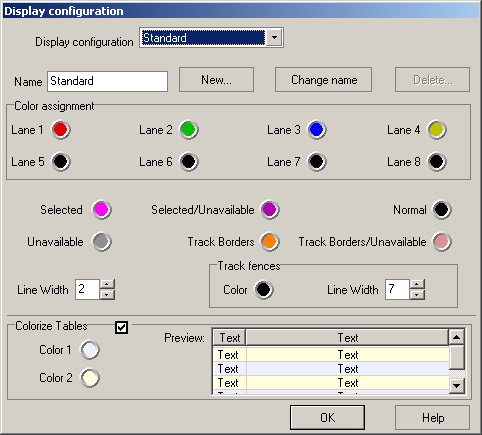
In this dialog you can create varying display setups. E.g. you can create display setups for the screen and the printer setups can be manipulated via the buttons “New”, “Rename” and “Delete”. There must always be at least one configuration. All options regarding colours apply to the configuration named in the upper part of the editor. The configuration of the display of the track sections is configured in the Display configuration for sectionsX07N4I. When printing a layout the configuration to use can be set up in the printer setup dialog.
Selected
This colour is used for the currently selected section in the track editor. The colour may be altered by clicking the coloured button.
Selected/Unavailable
This is the colour of the selected section if there are no more sections of this type available.
Normal
Colour for track sections which are not selected.
Unavailable
Colour for sections which are not selected and no more sections of this type are available.
Track Borders
Colour for track borders.
Track Borders/Unavailable
Colour for track borders if there are no more borders of this type available.
Note that these colour configurations are only used if there´s no display setup for the section types defined.
Line Width
Line width in pixels.
Track Fences
Colour and line width of track fences.
Colorize Tables
If this option is checked, the lines of all tables throughout the programm are colorized using the colors „1“ and „2“. In most cases, this enhances the table´s display. Colorizing is recommended for systems with 256 colors or more.
The preview on the right hand of the dialog gives a first impression of the colors currently chosen.
Created with the Personal Edition of HelpNDoc: Free CHM Help documentation generator