Track Editor Options
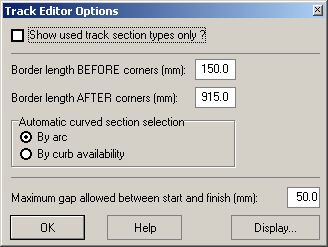
Show used track section types only
Decides if there are all track sections listed in the track editor that contain a part no. or just those where at least on section is available.
If this option is turned off all track sections that contain a part no. are listed. If it´s turned on, only those are listed which contain a part no and where at least one section is available. In both cases all section types are listed of which at least one section has been used in the current layout.
This option may be used to limit the list of section types to those you actually own.
This option is only used for 2-lane layouts.
Border length before/after corners
This parameter is only used for the automatic setup of track borders in the track editor and specifies the length of track borders that have to be attached to the outer track-side before or after the end of corners.
Automatic curved section selection
When designing layouts for more than 2 lanes the sections used in parallel are selected by the program automatically. This parameter changes the strategy in selecting the inner or outer curved section. This affects the algorithm only if there´s more than one curved section type available for a given radius. “By Arc” selects the section with the same arc as the originally planned section. In case of “By curb availability“ the section with available curbs is chosen.
Example: There are two curved sections for radius 1 available in the track system for Carrera Exclusiv/Evolution. Their arcs are 30 and 60 degrees. In case a 4-lane layout is designed, a Curve 2/30° is planned and the program has to choose which of the two curved sections for radius 1 is to use, the parameter alters the strategy as follows:
„By Arc“: Since the Curve for radius 2 covers 30 degrees, the curved section for radius 1 is also chosen for this arc: Curve 1/30°.
„By curb availability“: Since the inner curb for radius 1 covers 60 degrees, Curve 1/60° is used. This does not depend on the inner curb actually be used in this particular curve. Of course this selection means that one more Curve 2/30° is required. The additional curved section is automatically added.
WARNING: As the sections for lanes 3 to 8 are always created dynamically and since altering this parameter alters this process as well, changes made to this parameter may result in changes made to track layouts for more than 2 lanes that have already been designed.
Maximum gap allowed between start and finish
If the gap between start and finish of the planned layout exceeds this value the program raises a warning when the track editor is being closed. However the layout remains valid and may be used for timing etc.
Display...
Opens a Dialog1JUP9VW to setup some options for the display of the layout in the editor.
Created with the Personal Edition of HelpNDoc: Easily create Qt Help files