Annotations
The track editor can display annotations to the sections as well as free annotations.
Section annotations can be set up in the dialog Section StylesX07N4I . Their visibility is controlled via the Track Editor Display Dialog1JUP9VW or may be changed in the popup menu.
Free annotations are independent annotations which are not linked to sections directly.
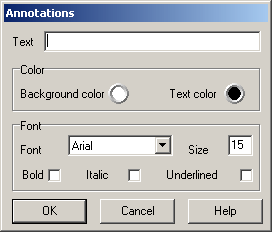
Use the popup menu to add, update or delete annotations.
Text, colours for text and background and the font and it´s parameters may be set up.
Annotations can be updated or deleted by placing the mouse over the annotation and calling the desired function from the popup menu. Annotations can be moved by dragging the annotation while holding the Alt-button.
Created with the Personal Edition of HelpNDoc: Free Qt Help documentation generator