Adding & Modifying Classes
KAdding & Modifying Classes
The Competition Class editing window allows you to add new competition classes or edit and modify existing entries in the Lap Timer 2000 Competition Classes database.
This window is displayed when the Add or Modify buttons are pressed on the Class DefinitionsClass Definitions property sheet page, or a new race class is added from the Race Settings Race EventRace Event property sheet page.
This editing window will also be displayed when new competition classes are added to the Hot LapsHot Laps Database Records database, or a new class is added to the QualifyingScheduling Qualifying Schedule.
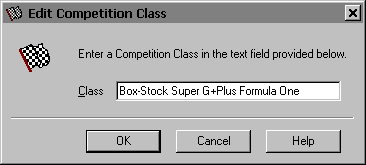
KClass
Use this entry field to enter the competition class. Competition classes such as Box-Stock Formula 1, Scalextric F1 or FLY Vintage GT can be entered in this text field.
KOK
Press this button when you have completed your additions or modifications. When you press this button the competition class definition will be saved.
KCancel
Press this button to close the Competition Class editing window without making any changes. If you have made any changes to the competition class definition and then press this button your changes will not be used, and your previous competition class definition will remain in use.
KHelp
Press this button to open the Lap Timer Help Window and go directly to the Adding & Modifying Classes topic.
Created with the Personal Edition of HelpNDoc: What is a Help Authoring tool?