

2nd-Jan-25, 02:17 PM
Hello Robbin,
That makes sense now, the computer has been updated to Windows 10 but is old enough to have the serial port. Lap Timer 2000 was developed when Windows 95 was in fashion so you may have to set the software to run in "Compatibility Mode". Hopefully you know how to get the Properties for the EXE file and set as below.
You can test the basic functionality by setting the Ports to "Keyboard" and using <1> and <2> to simulate car going round. I just tried this on my Win 10 computer and it works ok.
If you get success with this then the next challenge is to get the parts and wire up the sensors as per the wiring diagram above (DB-9 Connector).
Do you have a soldering iron and relevant skills?
Leo
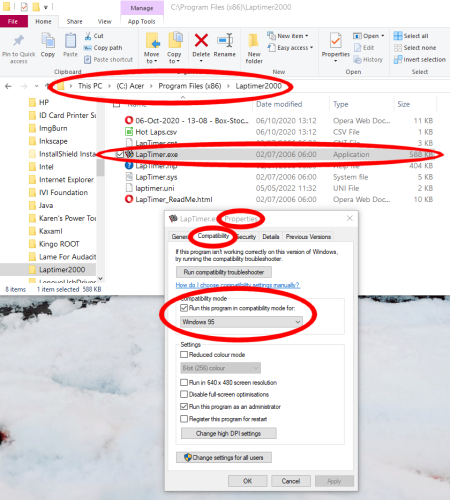

That makes sense now, the computer has been updated to Windows 10 but is old enough to have the serial port. Lap Timer 2000 was developed when Windows 95 was in fashion so you may have to set the software to run in "Compatibility Mode". Hopefully you know how to get the Properties for the EXE file and set as below.
You can test the basic functionality by setting the Ports to "Keyboard" and using <1> and <2> to simulate car going round. I just tried this on my Win 10 computer and it works ok.
If you get success with this then the next challenge is to get the parts and wire up the sensors as per the wiring diagram above (DB-9 Connector).
Do you have a soldering iron and relevant skills?
Leo
Forum Precepts: Don't hijack or divert topics - create a new one. Don't feed the Troll. http://www.scuderiaturini.com
![[+]](https://slotracer.online/community/images/bootbb/collapse_collapsed.png)