

1st-Jan-25, 11:21 PM
Hello Robbin,
Its very unlikely that a Windows 10 computer will have a serial port - please show a photo of what yours has.
Windows 10 computers have USB ports and these cannot be used with Lap Timer 2000. You would need to use Race Coordinator with an Arduino interface between the computer and the tack sensor.
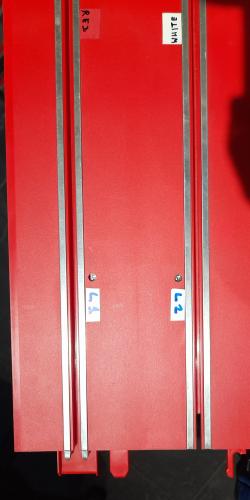
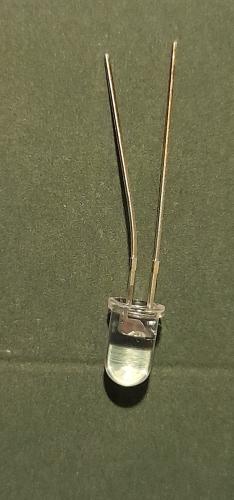
Anyway here are photos of how the Infar-red photo-diodes are fitted under the track - facing upwards through a hole drilled in the track surface. Also a photo of an I-R Photo Diode (note how one leg is longer that the other as seen in the wiring diagram above. For shielded cable I use Audio cables and these work very well. You can see the "phono" type connectors at the track connection.
Also desk lamp that I have used.
If you only need timing on one lane then you could use a smart-phone app such as Laptrax. That works very well if you are a solo racer.
(https://youtu.be/6e-wH78tu0s)
Leo


Its very unlikely that a Windows 10 computer will have a serial port - please show a photo of what yours has.
Windows 10 computers have USB ports and these cannot be used with Lap Timer 2000. You would need to use Race Coordinator with an Arduino interface between the computer and the tack sensor.
Anyway here are photos of how the Infar-red photo-diodes are fitted under the track - facing upwards through a hole drilled in the track surface. Also a photo of an I-R Photo Diode (note how one leg is longer that the other as seen in the wiring diagram above. For shielded cable I use Audio cables and these work very well. You can see the "phono" type connectors at the track connection.
Also desk lamp that I have used.
If you only need timing on one lane then you could use a smart-phone app such as Laptrax. That works very well if you are a solo racer.
(https://youtu.be/6e-wH78tu0s)
Leo
Forum Precepts: Don't hijack or divert topics - create a new one. Don't feed the Troll. http://www.scuderiaturini.com
![[+]](https://slotracer.online/community/images/bootbb/collapse_collapsed.png)