

14th-Apr-21, 08:51 AM
You beat me to it!
The final part of this tutorial is to wire up a controller to a round 3-pin 2-amp plug...
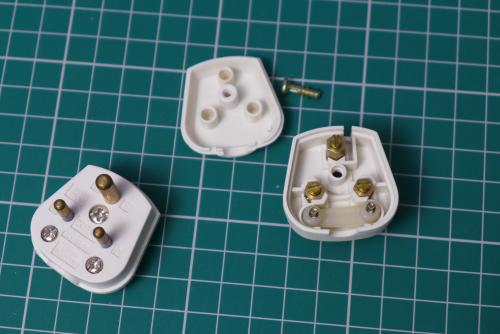
Some retailers will supply a new controller fitted with a connector of your choice. Pendle Slot Racing list the option of 'Club 3-pin 2-amp Plug' on all their DS resistor controllers for an extra £4. You can find them here. Otherwise, the plugs are available widely, including at TLC Electrical Supplies here.
The wiring diagrams for socket and plug (from the BSCRA website) were shown in the opening post. I've included them in this image...
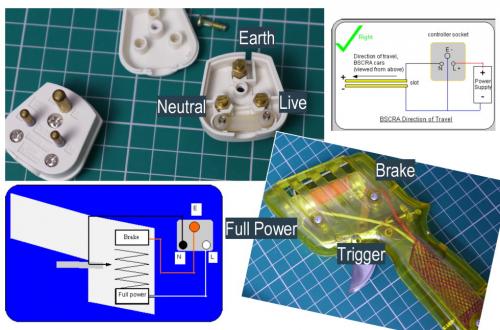
The metal connecting blocks inside the plug are handily labelled in the plastic casing 'L, N and E' - corresponding to the connectors in the socket. There should be no confusion over which is which. If you study the image above, you'll see how a basic resistor controller (like the Parma shown) is wired.
Essentially all controllers work on the same principle, just with different components controlling the power. It should be a relatively easy task to wire any controller to a plug - find out which wire goes to full power, brake and the trigger arm and you know where to connect it in the plug: Brake to Earth, Full Power to Live and Trigger Arm to Neutral.
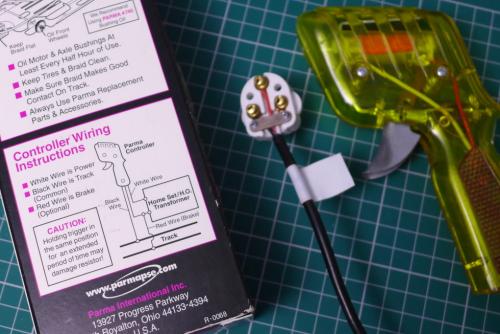
There's even a diagram on the Parma controller packaging. You don't get that on the DS controllers, but it is reasonably straightforward to look through the transparent handle and follow the wires to where they go - Brake, Full Power, Trigger Arm. On the DS v3.0 controllers, it's the standard Parma colours. Not all resistor controllers follow the same colour scheme - for example if you wanted to wire up a Ninco controller for use with a UK Club controller box, you will definitely need to take the controller apart and see where the wires go.
However, it's not very easy to follow the wires (and circuit boards) on most electronic controllers - we need to rely on the manufacturer's instructions. The Parma standard wiring - Red Brake, White Full Power, Black Trigger Arm - is a reference for many manufacturers, but not always... Let's look at two commonly-used controller brands, Truspeed and Slot.it...
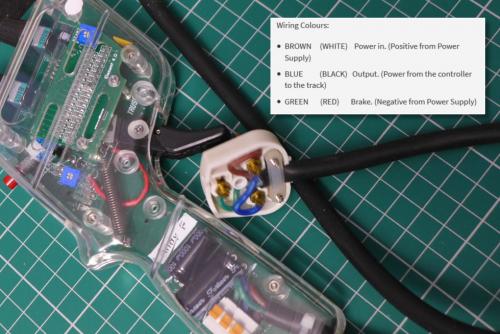
This is an early version Truspeed MT1 PWM controller. The instructions on the website give us the info we need, including the Parma wire colour equivalents. The Brown wire is 'Power in' so should be wired to the Live terminal on the plug. The Blue wire is 'Output' - power from controller to track - so should be wired to the Neutral terminal on the plug. The Green wire is the 'Brake' and should be wired to the Earth terminal on the plug.

This Slot.it SCP2 controller is fitted with an analogue cartridge. The SCP2 comes with a 'quick start' wiring diagram in the box. After some preamble - including the statement that the controller uses the standard Parma wire colours - two explanations are given. The second one is probably more useful - the White cable goes to the "positive terminal of the track" (the Live terminal on the plug); the Red cable goes to the "negative terminal of your track" (slightly confusing... this is shown as the Brake wire, so goes to the Earth terminal on the plug); and the Black cable to the "motor connector of your track" (meaning the +ve rail on the track via the Neutral terminal of the plug). Thankfully, the diagram makes the wiring explanations much clearer and confirms it is identical to the Parma wiring diagram.
Understandably, no-one wants to wire their controller incorrectly and risk damaging an expensive PWM or transistor controller. That's why it's important to try and understand the wiring diagrams as well as making sure all the connections are 100% correct. If you're in any doubt about a manufacturer's wiring instructions, contact them.
The final part of this tutorial is to wire up a controller to a round 3-pin 2-amp plug...
Some retailers will supply a new controller fitted with a connector of your choice. Pendle Slot Racing list the option of 'Club 3-pin 2-amp Plug' on all their DS resistor controllers for an extra £4. You can find them here. Otherwise, the plugs are available widely, including at TLC Electrical Supplies here.
The wiring diagrams for socket and plug (from the BSCRA website) were shown in the opening post. I've included them in this image...
The metal connecting blocks inside the plug are handily labelled in the plastic casing 'L, N and E' - corresponding to the connectors in the socket. There should be no confusion over which is which. If you study the image above, you'll see how a basic resistor controller (like the Parma shown) is wired.
- The controller controls the amount of power going to the track by the trigger arm moving along the resistor coil. If the Neutral and Live blocks were connected by a wire rather than the controller, the track would have full power all the time. The coil adds resistance to the electric circuit - the further away from Full Power, the more resistance and less power.
- At each end of the resistor coil is a thicker metal ring connected to a wire. The natural resting place of the trigger arm is on the brake position, which is connected to the Earth terminal. The Red wire is connected to the Brake ring on the Parma controller.
- At the opposite end of the resistor coil is the Full Power position - the Live terminal feeds into this end of the coil via the White wire. The Neutral terminal attaches to the trigger arm that moves up and down the coil. The Black wire connects to the trigger arm. When the trigger is squeezed hard, the arm should rest on the full power ring, the Neutral and Live terminals are connected directly - full power is applied to the track.
Essentially all controllers work on the same principle, just with different components controlling the power. It should be a relatively easy task to wire any controller to a plug - find out which wire goes to full power, brake and the trigger arm and you know where to connect it in the plug: Brake to Earth, Full Power to Live and Trigger Arm to Neutral.
There's even a diagram on the Parma controller packaging. You don't get that on the DS controllers, but it is reasonably straightforward to look through the transparent handle and follow the wires to where they go - Brake, Full Power, Trigger Arm. On the DS v3.0 controllers, it's the standard Parma colours. Not all resistor controllers follow the same colour scheme - for example if you wanted to wire up a Ninco controller for use with a UK Club controller box, you will definitely need to take the controller apart and see where the wires go.
However, it's not very easy to follow the wires (and circuit boards) on most electronic controllers - we need to rely on the manufacturer's instructions. The Parma standard wiring - Red Brake, White Full Power, Black Trigger Arm - is a reference for many manufacturers, but not always... Let's look at two commonly-used controller brands, Truspeed and Slot.it...
This is an early version Truspeed MT1 PWM controller. The instructions on the website give us the info we need, including the Parma wire colour equivalents. The Brown wire is 'Power in' so should be wired to the Live terminal on the plug. The Blue wire is 'Output' - power from controller to track - so should be wired to the Neutral terminal on the plug. The Green wire is the 'Brake' and should be wired to the Earth terminal on the plug.
This Slot.it SCP2 controller is fitted with an analogue cartridge. The SCP2 comes with a 'quick start' wiring diagram in the box. After some preamble - including the statement that the controller uses the standard Parma wire colours - two explanations are given. The second one is probably more useful - the White cable goes to the "positive terminal of the track" (the Live terminal on the plug); the Red cable goes to the "negative terminal of your track" (slightly confusing... this is shown as the Brake wire, so goes to the Earth terminal on the plug); and the Black cable to the "motor connector of your track" (meaning the +ve rail on the track via the Neutral terminal of the plug). Thankfully, the diagram makes the wiring explanations much clearer and confirms it is identical to the Parma wiring diagram.
Understandably, no-one wants to wire their controller incorrectly and risk damaging an expensive PWM or transistor controller. That's why it's important to try and understand the wiring diagrams as well as making sure all the connections are 100% correct. If you're in any doubt about a manufacturer's wiring instructions, contact them.
![[+]](https://slotracer.online/community/images/bootbb/collapse_collapsed.png)