
9th-Nov-26, 02:52 PM
SlotForge App Collection - for all Slotcar enthusiasts!


13th-Nov-26, 12:10 PM
Some big improvements to Telemetry, Paddock and smaller ones to Timing
Telemetry:
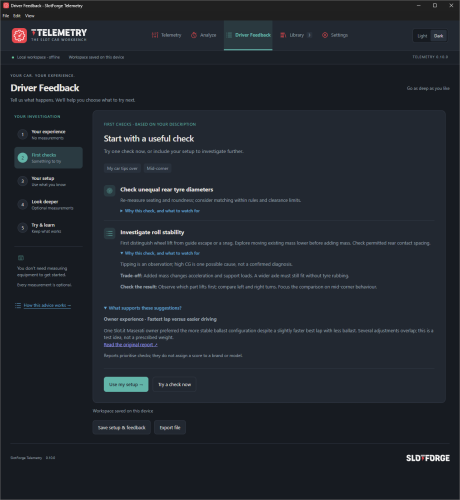
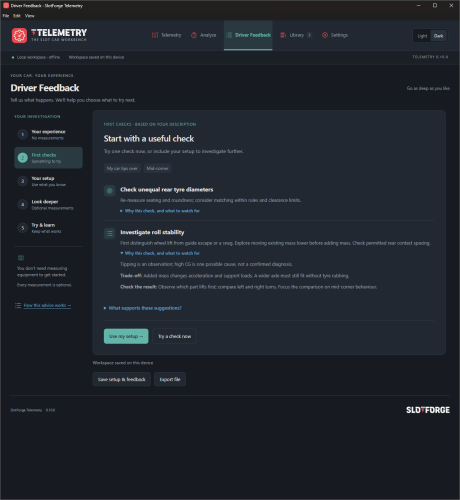
Driver Feedback: (Previously Predicted Performance) A guided tool that starts with your car’s handling problem, offers practical checks, and adds deeper analysis through optional measurements.
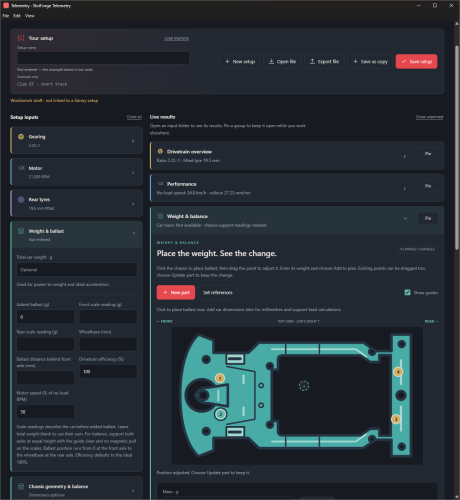
Compact workbench: Collapsible input and result sections reduce scrolling. Pin results to keep them visible while adjusting your setup.
Visual ballast planner: Click the chassis to add ballast, then drag it into position. Start with just its weight; add dimensions and scale readings later to calculate balance.
Paddock:
Introducing, Paddock Portal! as requested by Roguejackal
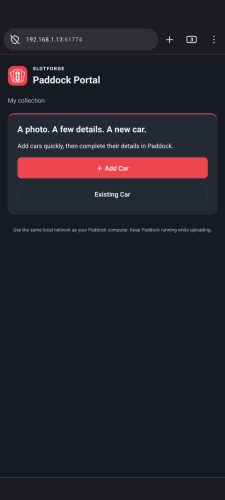
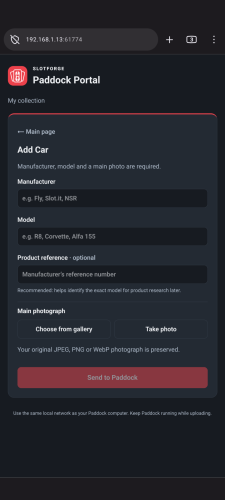
Paddock Portal: add cars from your phone or tablet with a camera/gallery photo.
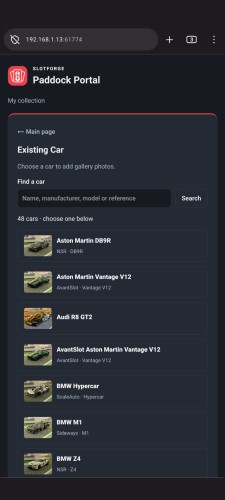
Additional photos: upload up to 5 photos to an existing car, keeping its main photo.
Easy connection: scan a QR code on the same Wi-Fi.
Works great! Worthwhile addition ?
Find it under Connections in the menu, right at the top.
Find the apps on Github: https://github.com/theDutchmanJames
Telemetry:
Driver Feedback: (Previously Predicted Performance) A guided tool that starts with your car’s handling problem, offers practical checks, and adds deeper analysis through optional measurements.
Compact workbench: Collapsible input and result sections reduce scrolling. Pin results to keep them visible while adjusting your setup.
Visual ballast planner: Click the chassis to add ballast, then drag it into position. Start with just its weight; add dimensions and scale readings later to calculate balance.
Paddock:
Introducing, Paddock Portal! as requested by Roguejackal
Paddock Portal: add cars from your phone or tablet with a camera/gallery photo.
Additional photos: upload up to 5 photos to an existing car, keeping its main photo.
Easy connection: scan a QR code on the same Wi-Fi.
Works great! Worthwhile addition ?
Find it under Connections in the menu, right at the top.
Find the apps on Github: https://github.com/theDutchmanJames
13th-Nov-26, 04:49 PM
I'd really like for people to just try things out. Download one of the apps you are interested in, click around and let me know what felt good and what didn't!
I am very open to user suggestions so, bring it on! These apps are all about the user, and trying to fill in each gap there is software-wise and then making that software as user friendly as possible :) so, it's all about you guys!
https://github.com/theDutchmanJames
I am very open to user suggestions so, bring it on! These apps are all about the user, and trying to fill in each gap there is software-wise and then making that software as user friendly as possible :) so, it's all about you guys!
https://github.com/theDutchmanJames
17th-Nov-26, 02:06 PM
All the SlotForge apps have been massively updated and improved, bringing lots of changes!
I'm not gonna bore you with a long list of changes of all the apps, so just check out:
the SlotForge Website or the related GitHub pages!
Always looking for feedback, so don't be shy! :)

17th-Nov-26, 06:49 PM
Why is v0.3.26 zip only 6MB but v4 zip is 115/126 MB
Life is like a box of Slot cars...


17th-Nov-26, 06:58 PM
Also, I can't run either the portable or setup files unless I open with 7-zip, go into pluginsdir, open app-64 with 7-zip and run slotforgecircuit exe and my previous designs aren't seen by v4
So far I've been using v0.3.26 again having to use 7-zip but running the program with index html file
So far I've been using v0.3.26 again having to use 7-zip but running the program with index html file
Life is like a box of Slot cars...
17th-Nov-26, 07:16 PM
Thanks Kev, I'll get on it straight away!
It's bigger because it includes portable (pre-installed) and installer apps :)
It's bigger because it includes portable (pre-installed) and installer apps :)
17th-Nov-26, 07:21 PM
Older designs not showing
The v0.4 app looks in the same place the v0.3 installed app saved to,
. So older designs only go missing if they were saved somewhere else. The reason is opening the v0.3 HTML file straight in a web browser: that saves inside the browser, which the desktop app can’t see. In that case:
Before we only had the .html to launch, so that might cause this issue. I'll see if I can find a way for the APP version to find the old library automagically ;-)
The v0.4 app looks in the same place the v0.3 installed app saved to,
Code:
%LOCALAPPDATA%\SlotForgeTrackBuilder\data- Open the old version the way they used to → Storage (bottom-right) → Download workspace backup.
- In v0.4 → Storage → Import workspace transfer, then Reload imported workspace.
Before we only had the .html to launch, so that might cause this issue. I'll see if I can find a way for the APP version to find the old library automagically ;-)
17th-Nov-26, 07:25 PM
1. Through the old version (works today, nothing to build)
Browser saves belong to the browser that made them.
Chrome and Edge keep page saves in a LevelDB folder in the user’s profile, and Firefox keeps them in small SQLite files. Circuit could get a button, something like Storage → Look for designs saved in a browser. It would read those files (read-only), show what it found, and import what you choose.
It’s doable, but it has drawbacks:
You have to explain the unzip option in more detail, because i can unzip and run the app fine so I don't know what's going on with yours? Screenshots are always great :)
Browser saves belong to the browser that made them.
- Opens the old v0.3
- in the same browser they used before.
- Checks their designs are there, then clicks Storage (bottom-right) → Download workspace backup.
- In v0.4, goes to Storage → Import workspace transfer → Reload imported workspace.
Chrome and Edge keep page saves in a LevelDB folder in the user’s profile, and Firefox keeps them in small SQLite files. Circuit could get a button, something like Storage → Look for designs saved in a browser. It would read those files (read-only), show what it found, and import what you choose.
It’s doable, but it has drawbacks:
- Those are internal browser formats that can change between browser updates, so it could break without warning.
- The browser has to be closed while Circuit reads its files.
- It only helps people who used the browser edition, which is a shrinking group. (yeah, 2 people maybe
 )
You have to explain the unzip option in more detail, because i can unzip and run the app fine so I don't know what's going on with yours? Screenshots are always great :)

« Next Oldest | Next Newest »
Possibly Related Threads...
Thread / Author
Replies
Views
Last Post
Users browsing this thread: 2 Guest(s)