Posts: 25
Threads: 4
Likes Received: 27 in 12 posts
Likes Given: 3
Joined: Oct 2026
 1st-Nov-26, 12:56 PM
So, I now have made 5 apps for all kinds of needs and since I don't want to flood the forum further with separate topics; here's what's what! :)
- SlotForge Timing — Lap timing and race management for analogue tracks. Run practice, heats, championships and endurance events, with custom race displays, spoken announcements and optional fuel, tyre and weather simulations.
- SlotForge Circuit — Design your track before building it. Plan sectional or routed wood layouts, draw freeform circuits, check how they fit your space and export designs for use with Timing.
- SlotForge Paddock — Your virtual garage and workshop. Showcase your collection, organise spare parts, record setups and maintenance, and keep track of what’s fitted to each car.
- SlotForge Telemetry — Explore the numbers behind your setup. Calculate gearing, theoretical speed, torque, power, weight balance and tyre clearance, then save and compare configurations with clear graphs and explanations.
- SlotForge Livery — Plan your next paint job. Create reusable 2D car templates from your own artwork, experiment with colours, stripes, decals and race numbers, then export or share editable designs.
Each link includes more details, screenshots and installation instructions. Feedback and ideas from fellow slotcar enthusiasts are very welcome!
Posts: 4,549
Threads: 147
Likes Received: 3,074 in 1,825 posts
Likes Given: 4,247
Joined: Apr 2019
Location Isle of Man
SlotForge Livery... not seen that before

Life is like a box of Slot cars...


 •
Posts: 25
Threads: 4
Likes Received: 27 in 12 posts
Likes Given: 3
Joined: Oct 2026
Can't help myself

•
Posts: 4,549
Threads: 147
Likes Received: 3,074 in 1,825 posts
Likes Given: 4,247
Joined: Apr 2019
Location Isle of Man
Now if only it was possible to create a 3D file with a set wall thickness from photographs.............
Life is like a box of Slot cars...
•
Posts: 25
Threads: 4
Likes Received: 27 in 12 posts
Likes Given: 3
Joined: Oct 2026
It had crossed my mind but you either need proper photogrammetry software for that or something with a very strong built-in AI that does the thinking, so it's beyond my abilities :(
•
Posts: 25
Threads: 4
Likes Received: 27 in 12 posts
Likes Given: 3
Joined: Oct 2026
a new app is born,
SlotForge Decals!
SlotForge Decals -
Design. Scale. Print.
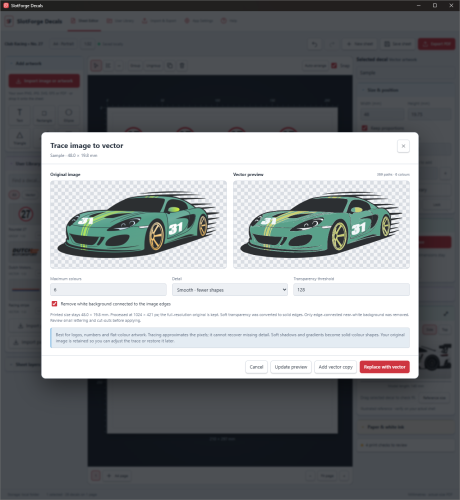
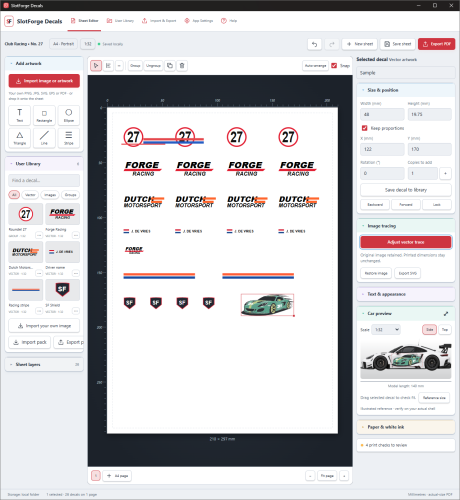
Decals is your handy helper in making print ready decal sheets on A4's. Draw your own shapes, make your own designs, or import .png files (with optional conversion to vector images), .pdf, .svg or .eps files, sort them, scale them with a live size-preview and share all your decal sheets or designs with optional export and import functionality!
Download
SlotForge Decals from Github!
Click here to Download!
Posts: 4,549
Threads: 147
Likes Received: 3,074 in 1,825 posts
Likes Given: 4,247
Joined: Apr 2019
Location Isle of Man
Life is like a box of Slot cars...
Posts: 25
Threads: 4
Likes Received: 27 in 12 posts
Likes Given: 3
Joined: Oct 2026
Lots of small updates to all apps, and some major ones which I'll list here:
A small update to
Circuit, version
0.3.23- Clearer SVG exports: black lines by default, with fine coloured lines still available in SVG / DXF → SVG appearance.
- Fold override: keep a folded routed section as an editable planning piece. Find Override folds · planning only near the bottom of the flowing-curve editor.
- Preview car sizes: Tune profile → Car size now offers 1:32, 1:24, 1:42, 1:64, plus custom length and width.
- Corrected edge clearances: new flowing bends match the profile preview, straight previews respect reflection, and newly added straights align their margins with adjoining pieces.
- Review fixes: corrected the timing status after deleting its piece and prevented large SVG outlines from being clipped.
Scale accurate cars and just crazy sharp corners because you can override fold warning:
version
0.2.17 is out for
Decals, which brings:
- Path Tool: Draw freehand lines and Bézier curves directly on the canvas, then edit their points and handles.
- Merge & Cut: Combine shapes, cut holes, or keep/exclude overlapping areas.
- More shapes: Stars, arrows, diamonds, shields, polygons and more.
- Better racing patterns: Checkerboards with exact square sizes, plus 1–12 stripes with individual widths and consistent spacing.
- Improved libraries: Grid/two-column list views, sorting, search, multi-selection and scrolling.
- Easier sharing: Import/export selected decals, entire sheets or selected pages.
- Save selected artwork: Turn one or more canvas items into a reusable library decal.
- Clearer controls: More visible sheet naming, Scale Conversion, Add Sheet and working orientation switching.
Plus fixes for undo/redo, saving, preview layering and small-path accuracy
Some very cool additions have been made to
Paddock in version
1.1.1!
- Car History! You can gather up all the historical racing facts about your specific car and keep those linked to your car. You can either use Automatic Scrape on a website (results will be iffy I think) or use a pre-made AI template, which you can have a random AI fill which you can then import to Paddock with hopefully better results.
- Compare Cars! Do you have a big collection and you race them all? You can now more easily compare similarly paced cars!
- Some extra technical information, like in which lane the car has been driven, the voltage it was run at, etc..
Posts: 25
Threads: 4
Likes Received: 27 in 12 posts
Likes Given: 3
Joined: Oct 2026
And a big upgrade for
Paddock; It now uses SQLite for it's database! Nothing for you guys to worry about, but this makes big collections possible :) Other apps will make the switch as well, but you won't notice that :)
It's released on Github under version
1.2.0 -
Click to Download!- SQLite storage with automatic migration of existing collections.
- Faster startup and saves, loading data when needed.
- More efficient Dealership syncing using incremental updates.
- Original-quality photos and removal of the old 200 MiB total collection cap.
- Portable backups with verified restoration.
- Continued Timing and Telemetry compatibility.
What does SQLite mean for the end users?
Paddock now uses SQLite to store your collection more efficiently. For users, this means faster startup, smoother saving and better handling of large collections with lots of photos and race history.
Your existing data transfers automatically. Everything works as before—including Timing, Telemetry and Dealership Mode—with no extra software or setup needed.
Still problems with the native builders on Github for macOS, so you have to compile that one yourself via the source .zip, using the mac-build-quick command thingy.
Posts: 25
Threads: 4
Likes Received: 27 in 12 posts
Likes Given: 3
Joined: Oct 2026
Many updates to all Apps!
Circuit, Livery, Telemetry and Decals all have been updated with new features to make life more easy. Paddock and Timing will get updates later.
Circuit:
[*]Builder → Planning tools: measurements, PDF dimensions, reference images, clickable checks, shopping lists, gap assistant, curvature colours and car envelopes.
[*]Selection → Group, lock, replace & ramp: organise pieces, protect finished sections, preview replacements and set ramp heights.
[*]Builder → Colour by piece: quickly identify curve radii and straight lengths.
[*]Selection / Custom piece editor → Squeeze / Spread lanes: adjust plastic-piece lanes while keeping the road outline unchanged.
[*]FreeForm Drawing: continuous squeeze/spread, ramps, smoothing selected joins, and View & measure tools.
[*]Planning tools → Convert routed layout to FreeForm: bring existing routed sections into continuous editing.
Livery:
[*]Richer SVG, EPS and PDF decals — open Import & Export → Import decal artwork or Decals sheet.
[*]SlotForge Decals integration — import .sfsheet and .sfdecal files and choose individual decals, preserving their artwork and embedded fonts.
[*]Library-first importing — save decals without changing your car, then use User Library → Shapes & Images → Place. Placing multiple decals directly now requires an explicit choice.
[*]Separate artwork from sheets — select Select separate decals during PDF/SVG import and draw crop boxes. Optional white-background removal is included.
[*]Group scaling — select a group or multiple layers, then use Scale selection in the right panel, or drag the selection’s corner handle.
Telemetry:
Magnetic downforce: repeated pull measurements, force and weight-relative calculations, clearance graphs, tyre-wear scenarios and club-limit margins.
Eleven Testing & planning tools:
Tyre preparation & life - Target diameter, tyre matching and measured wear forecasts
Electrical losses - Voltage drop, resistance and power loss
Motor test records - Individual measurements, torque, loaded power and efficiency
Race strategy - Incident losses, pit costs and break-even calculations
Ballast planning - Multiple added/removed parts and target weight distribution
Controlled A–B–A tests - Pace, consistency, incidents and baseline drift
Class limits - Measurement checks and margins against entered rules
Compound gears & geometry - Multi-stage ratios and standard spur-gear dimensions
Rotating mass - Equivalent inertia mass and ideal acceleration
Braking & coast-down - Measured speed traces, distance and deceleration
Measurement ranges - How measurement uncertainty affects calculated results
Also included:
Lap snapshots from Saved inputs, backup support, analysis tables and graphs.
[*]Formula guides, worked examples and calculation limits.
[*]Theme-aware SlotForge logos in the header and footer.
[*]Updated README, release notes and installation instructions.
Decals:
Select a vector decal, then click Edit Vector Artwork in the right-hand panel.
Click a shape or use Next white shape, then remove it.
Check the result with transparent, light or dark previews and zoom.
Use Undo/Redo, Cancel, or Restore original—even after saving and reopening.
•


