Magnets
The administration of drivers is similar to the management of CarsNQ95BK.
Again, this is only used for timing functionality.
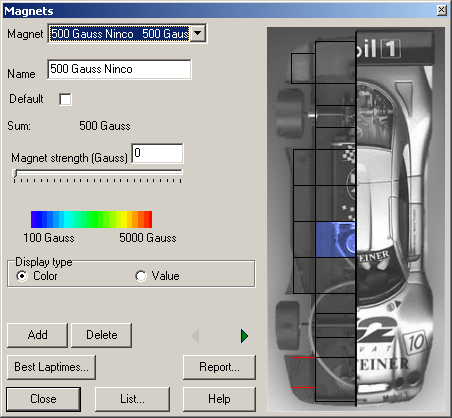
Magnets are added by clicking the corresponding part of the chassis displayed on the right of the dialog and by setting it´s value using the text field or slider control. This way the position and strength of the magnet is configured.
Note that the displayed values are meant to reflect the correct value on the left AND right of the car (a symmetrical setup is assumed).The right part of the image only serves for better orientation (car front and rear).
The current chassis part is coloured or marked according to the magnet´s strength.
The option “Value” is recommended on older computers.
If the parameters have been set, the magnet setup´s description can be saved using the “Add”-button. Parameters are changed by going to the previous or next description (“<” or “>”), using the list or report or by closing the dialog (“Close”).
Clicking the “Best Laptimes”-button starts the dialog for analysing the Best laptimes10KJFMO and filters the lap times using the current description.
Use “Delete” to remove a description and all of it´s associated lap times etc.
Report
Opens the ReportOEEVSP dialog to output reports to the printer or a file.
Created with the Personal Edition of HelpNDoc: Easily create EPub books