

1st-May-25, 08:58 AM
3D Scanning
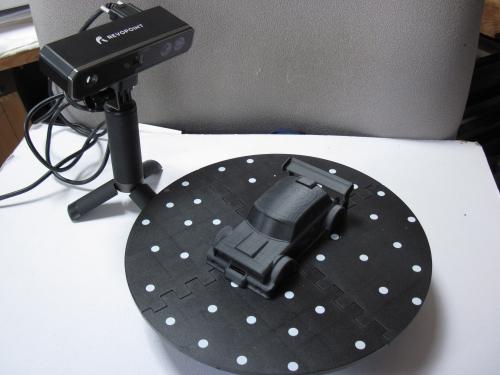 Revopoint 3d scanner system
From originally creating my own chassis’ using CAD for 3d printing, I wanted to move into creating bodyshells and realised, that although certain bodyshells are within my ability to create in CAD i.e. the CAN AM cars of the cheese dish variety, the 1950s cars like the Jaguars and Ferraris are not. These 1950-60s sports cars with compound curves in 3 planes, are a lot harder to replicate in CAD and very time consuming/frustrating to derive the curves correctly.
Hard to create
 AS DBR4Z
Easier to create
 Wolf
Wolf
Thinking that a 3d scanner would shortcut this (if you have a shell to scan), I found however the level of capability v price point (£1000+) was out of reach five or so years ago. More recently there was a new range of scanners on the market, from Revopoint, Creality and others and the price point had tumbled (sub £500). After reading reviews and watching Youtube reviews I decided to take the plunge and bought a Revopoint Mini in an Amazon Black Friday sale.
The scanner comes as shown with the scanner, tripod and turntable, the software is downloaded from the Revopoint site and consists of the scanner software and a basic editor of completed scans. The editor software will output in multiple formats and has some useful features to weld meshes, trim, smooth, fill holes and resize the file.
The Revopoint scanner uses a laser rather than an infra red beam, and claimed accuracy is down to 0.05mm or 0.02mm for the newer models. Models are placed on the turntable and the scan takes @ 2-3minutes (turntable speed is adjustable), then repeated at a different angle to try and capture as much detail as possible.
So what models can the Revopoint Mini do…
Well it can scan bodyshells from 1/43 to 1/24 just, as cars longer than 150mm progressively leads to focus and then quality issues, or requires multiple scans and stitching or complex sectioning.
To illustrate,
 die-cast Merc
This was a £2 1/32 scale die-cast from the local toy fair, stripped down and sprayed matt white.
 Scanned image
Then,
 Cleaned up in Studio then Blender.
after some CAD work we have a 1957 Mercedes racer.

And finally printed

Scalextric TR7 scan

And again after clean up and some CAD work we have a TR8 IMSA
 IMSA TR8
The end result, below is the printed TR8 alongside an IMSA version of the Datsun 260 using the same technique.
 Datsun & TR8 printed
Scanning can be less than perfect and hence the amount of work then involved to get a usable shell from these is a coin toss. Sometimes it is just better to bin the scan and start again as it can take hours using a mesh editor like Blender to clean up, re-mesh, thicken and correct mesh errors, such that it will drop into the CAD program to have new parts blended in i.e. arches or sections removed to modify the front/rear etc.
'Side scan sonar' F1 & Datsun i.e. less than desirable scans


To get good scan results requires patience, practice and research into techniques i.e. the best results I found were obtained by spraying the bodies matt white (Games workshop white primer spray works well) which was a lot cheaper and more consistent than the £30 can of special scanning spray I tried. Program scan settings, model preparation, ambient light, turntable speed, scan distance are all critical hence the practice and research to get viable results.
Secondly it is essential to have software for mesh editing and correction, such as Blender and Meshmixer to complement the scanner & CAD software plus the knowledge on how to use them to turn a scanned object into a shell.
Fundamentality what it doesn’t do, is create a bodyshell file that will go straight to print via the slicer software but it will with practice give you a working outline that can be turned with the right software and some hours of work into a viable shell.
Cheers
John
From originally creating my own chassis’ using CAD for 3d printing, I wanted to move into creating bodyshells and realised, that although certain bodyshells are within my ability to create in CAD i.e. the CAN AM cars of the cheese dish variety, the 1950s cars like the Jaguars and Ferraris are not. These 1950-60s sports cars with compound curves in 3 planes, are a lot harder to replicate in CAD and very time consuming/frustrating to derive the curves correctly.
Hard to create
Easier to create
Thinking that a 3d scanner would shortcut this (if you have a shell to scan), I found however the level of capability v price point (£1000+) was out of reach five or so years ago. More recently there was a new range of scanners on the market, from Revopoint, Creality and others and the price point had tumbled (sub £500). After reading reviews and watching Youtube reviews I decided to take the plunge and bought a Revopoint Mini in an Amazon Black Friday sale.
The scanner comes as shown with the scanner, tripod and turntable, the software is downloaded from the Revopoint site and consists of the scanner software and a basic editor of completed scans. The editor software will output in multiple formats and has some useful features to weld meshes, trim, smooth, fill holes and resize the file.
The Revopoint scanner uses a laser rather than an infra red beam, and claimed accuracy is down to 0.05mm or 0.02mm for the newer models. Models are placed on the turntable and the scan takes @ 2-3minutes (turntable speed is adjustable), then repeated at a different angle to try and capture as much detail as possible.
So what models can the Revopoint Mini do…
Well it can scan bodyshells from 1/43 to 1/24 just, as cars longer than 150mm progressively leads to focus and then quality issues, or requires multiple scans and stitching or complex sectioning.
To illustrate,
This was a £2 1/32 scale die-cast from the local toy fair, stripped down and sprayed matt white.
Then,
after some CAD work we have a 1957 Mercedes racer.
And finally printed
Scalextric TR7 scan
And again after clean up and some CAD work we have a TR8 IMSA
The end result, below is the printed TR8 alongside an IMSA version of the Datsun 260 using the same technique.
Scanning can be less than perfect and hence the amount of work then involved to get a usable shell from these is a coin toss. Sometimes it is just better to bin the scan and start again as it can take hours using a mesh editor like Blender to clean up, re-mesh, thicken and correct mesh errors, such that it will drop into the CAD program to have new parts blended in i.e. arches or sections removed to modify the front/rear etc.
'Side scan sonar' F1 & Datsun i.e. less than desirable scans
To get good scan results requires patience, practice and research into techniques i.e. the best results I found were obtained by spraying the bodies matt white (Games workshop white primer spray works well) which was a lot cheaper and more consistent than the £30 can of special scanning spray I tried. Program scan settings, model preparation, ambient light, turntable speed, scan distance are all critical hence the practice and research to get viable results.
Secondly it is essential to have software for mesh editing and correction, such as Blender and Meshmixer to complement the scanner & CAD software plus the knowledge on how to use them to turn a scanned object into a shell.
Fundamentality what it doesn’t do, is create a bodyshell file that will go straight to print via the slicer software but it will with practice give you a working outline that can be turned with the right software and some hours of work into a viable shell.
Cheers
John
Mr Fit for Function.
![[+]](https://slotracer.online/community/images/bootbb/collapse_collapsed.png)


