


SLOTFORGE TIMING
Right down to business: So, not to get in the way of RaceCoordinator or anything, but I just like having what I want ? I don't really like that 90's look and feel of pretty much all Slotcar Timing apps so I set out to make one with a modern UI, which not only looks good but works intuitively as well. I'm not one to gatekeep and I think the app turned out fine so why not share it.. I think RCAI is more powerful simply because it supports more Timing Hardware and its creator can actually write code. I cannot code, only bug Claude with ideas and things I want. Fuel is pretty simple for example, and I have no clue if the Heat or Round Robin settings work as they should because I don't use those features, I just asked what the AI thought it should be. I just like racing slotcars in my little wooden shed with a few mates chasing fastest laps and because I'm a bit of a tidy nerd who loves data, I'd like it if I had all that information in 1 spot. Hence, a central Database which records all Race Results, linked to a driver, car and all lapdata. I've prompted Claude AI to death and told it what I wanted out of a slotcar timing app, while keeping some points you guys raised for RCAI and tried to incorporate those too. Right now, it only works with Trackmate Timing hardware (the latest one with the blue box) because that's the only hardware I have.
If you're interested, you can download it here:
SlotForge Timing App - Direct Download from Google Drive
GitHub - Work in Progress
Key Features of SlotForge Timing:
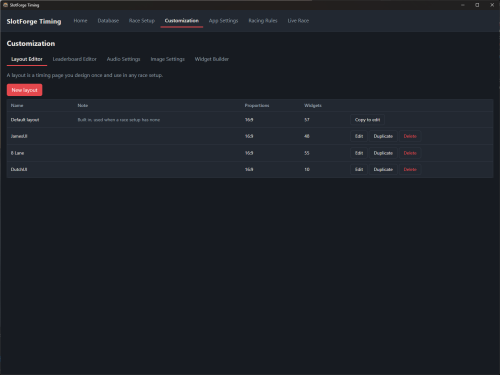
Fully and extremely customizable Timing Page - Lots of widgets to choose from with lots of customization options on how it it presented on screen.
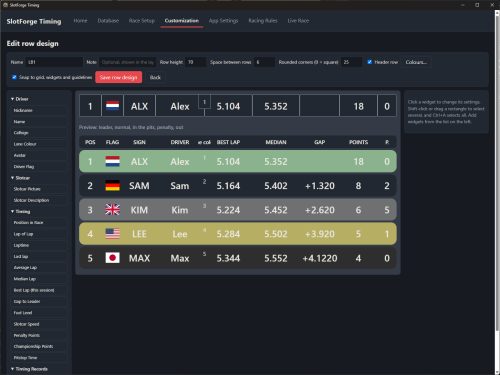
Powerful Leaderboard Style Editor - linked to a widget but also a live leaderboard page. Saveable as a 'setup', make as many as you want for multiple boards.)
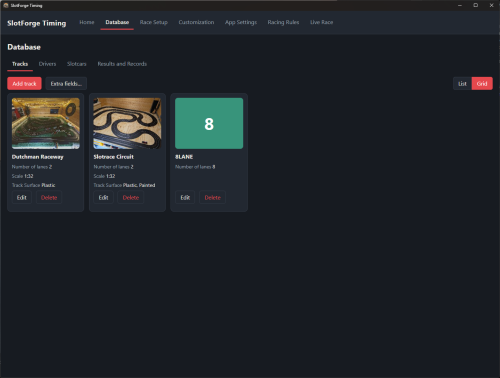
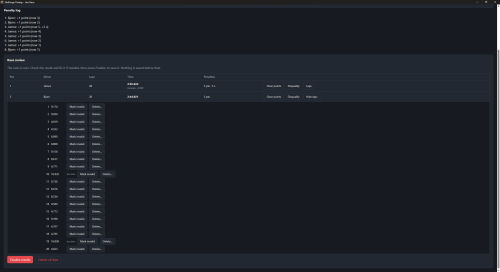
Database for your Tracks, Drivers, Slotcars and Race Results - Extra fields can be added, Race Results can be reviewed and exported to PDF.
The info contained in the PDF can be chosen to your liking.
Race Results and Records Database - Are linked to Driver, Car, Track, and time. Can display more info.
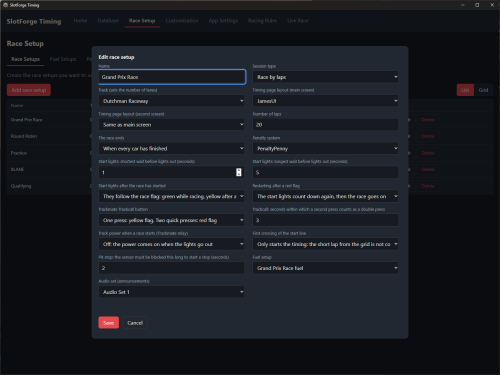
Setting up races of different Session Types with its own rules - Indefinite Free Practice, Qualifying with carry-over results, Race, Round Robin, Heats
Customizable Audio settings - A big list of Audio calls with different {variables}, all Text-to-Speech which whatever you have installed on your computer. Can upload custom audio files. Can add custom Calls and build your own using the {variables}.
Customizable Image Settings - Set standard images for the Race Flags, Start Lights or Fuel States, can be applied per race.
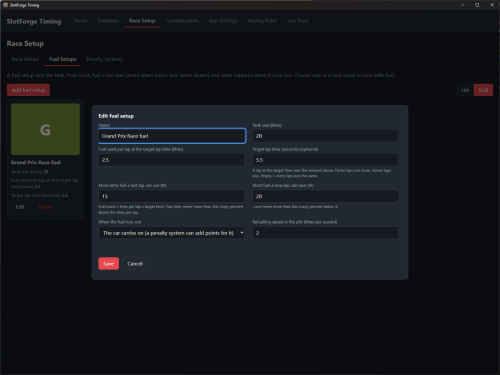
Basic Fuel Settings - Tank size, Fuel consumption, variance of fuel usage linked to laptimes, Pitstop refuel speed. All customizable.
Basic Penalty System - Add Penalty Points, or Special Penalties like a Stop and Go penalty which 'forces' the driver to stop on the sensor for a set amount of time.
Basic Time Token System - Do you sell Track Time on your Racetrack? There's a simple manual system in place for that which all kinds of visual cues.
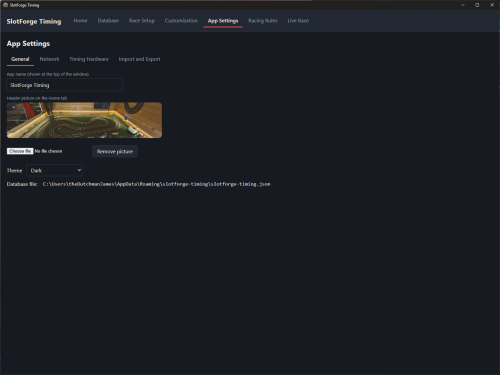
General App Settings - for a Club Logo or Header Image, custom colours for the whole app look and feel.
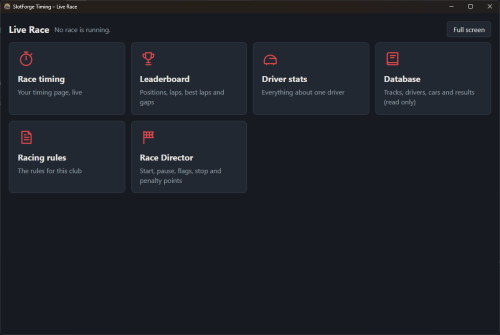
Live Race Page / Multiple Screens - Want to connect to the Timing Page, Leaderboard or Driver specific statistics? Connect through localhost or QR-code to land on a landing page with several viewing options. Clicking the Live Race tab opens a second window on your second screen (if present, otherwise on main).
Import and Export of Race Layouts, Widgets, Audio Sets etc
.. and some more small tidbits
Note: It only works with recent TrackMate Hardware! You can fully test it and use it without running a race though.
Works on Windows, untested on Linux or macOS (Intel and Apple Silicon) - Installers are provided though.
Yes, you can rename the app's name top left to whatever you like.
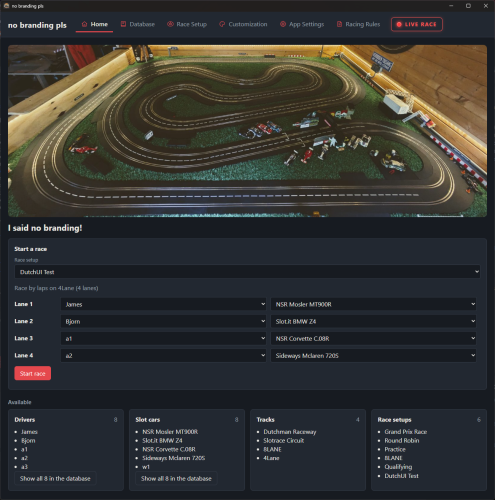
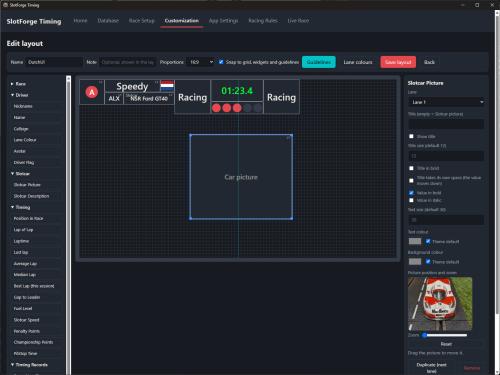
Possibilities of building your own Race Timing Page .. I just stuck a bunch of possible widgets in, still, there is more
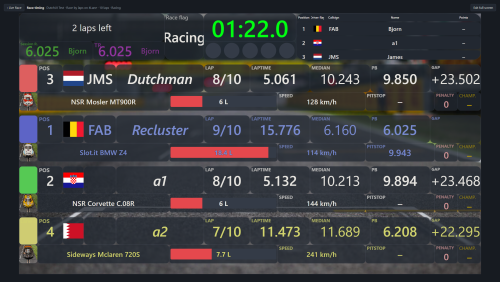
So this is just an example. It doesn't have to have a background image or transparancy, be ordered in this way, and have the widgets where they are or even have those widgets at all.
Everything is easily customizable, scaleable, freely moveable and with a somewhat smart duplication button for the next lane. You can select multiple widgets and hit duplicate which automatically assigns the next lane to them, you can them drag and drop the copied widgets to where you want it.
Horizontally or Vertically, no problem. Magnetically on a grid, to other widgets, or to guidelines both horizontal or vertical, number definabe. Uniform for the whole layout, or per widget override.
Text size, Colour Options for text, widget background (lane color, something you choose, or inherited from the theme), Corner Radius, Transparancy, Screen Background Colour or Image, with Image Effect Sliders.
Widgets taking information from the database, lane, or override per widget, really.. whatever you want.
Sorry for this messy list, there's just so much you can do. This level of customization is also available for Leaderboard Editor and Leaderboard widget, with some nifty sliders to get things displayed exactly on the widget as you want.
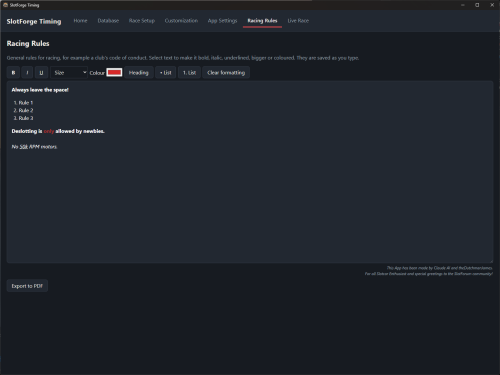
Some Screenshots (might be somewhat outdated): (the theme can be changed to presets if you dont like the colors, or make your own.)
Claude's summary of what this app does:
SlotForge Timing is a Windows (Linux and macOS soon™, installers included though) app for running slot car races. It counts laps and times, keeps your data, and shows the race on screens.
Unzip it. There is 'build-windows.bat' file. Run that for a minute or two, (this pulls and builds all the things it need to make this an app. It also does a ton of checks, no clue why, but checks are a good thing though right?), then run the Portable .exe so it doesn't have to install to any folders on your computer. If you do want it installed, go with the other one but portable is easy to just check the app out. It'll ask for local network access because there is an extra, second display which you can connect to through localhost IP (e.g: 192.1.68.85:8080) or QR (the QR code and IP can be printed on A4), if you choose to turn it on. (This is the Live Race tab)
How do I get started?
There are default settings for everything, so you could dive right in by clicking 'Open the Session' on the Home tab. Make sure to setup your TrackMate interface first, under the App Settings tab. Approach the App like you would a physical track. you start out with a track , so add one on Database tab under Tracks.
0. Add Trackmate Timing Interface
1. Add a track under Database, Tracks. You are presented with a bunch of options you can skip for now, only lane number is really necessary. Track length might useful.
2. Then add a Driver and a Slotcar, skip all options.
3. Set up a race under Race Setup. Pick a Session Type. Skip Options, or not.
4. Go back to Home, Pick your race and hit Start Race/Open the Session.
This sets up a basic race. There is a default one in place as well, but this would get you started on customization later on, when you are comfortable with that.
Now, If you like this app great. Missing Hardware interfaces? Tough luck because again, I cannot code, only annoy AI. If you write up a detailed explanation of what's missing or what needs changing I can jam it in the AI and hope it does a good job of what you want. I will only implement things if I think it helps the app's look and feel and usage because I mainly designed this for myself, but it turned out pretty well and I just kept adding features and now it is what it is. Some features might not be fleshed out enough but perhaps one of you has a great idea about how it should work so feel free to let me know. Structural changes to how certain systems within the app work are fairly easy to be honest.
If you're interested, you can download it here:
SlotForge Timing App - Direct Download from Google Drive
GitHub - Work in Progress
Note: It only works with recent TrackMate Hardware!
I think you need to install the TrackMate Driver as well, you do this by installing their own app. People who have used their TrackMate Hardware before and got it working will most likely have this driver installed already.
If you want support for other hardware, I'd suggest dumping the entire folder which contains this app on your own AI agent (I'd suggest Claude, it made this and it's done a great job if you ask me), and see if you can add a page to Timing Hardware tab under 'Other' (I've told Claude to prepare that) and get the software to work with the hardware. I only have the latest TrackMate 2-lane timing system, thus, it's the only one I can add with certainty that it actually works, because I can test it personally. Do you want to help out in getting your hardware to work with this app? Reach out and we'll try to figure it out and get it working!
Feedback? Questions? Yes please! But remember I can only test this with Trackmate Hardware, so if it's about app functionality I can adjust or add things!
It works for me, I hope it works for you :)
Most Recent App Version: 0.99
This app is FREE - use and abuse it as you like.
Right down to business: So, not to get in the way of RaceCoordinator or anything, but I just like having what I want ? I don't really like that 90's look and feel of pretty much all Slotcar Timing apps so I set out to make one with a modern UI, which not only looks good but works intuitively as well. I'm not one to gatekeep and I think the app turned out fine so why not share it.. I think RCAI is more powerful simply because it supports more Timing Hardware and its creator can actually write code. I cannot code, only bug Claude with ideas and things I want. Fuel is pretty simple for example, and I have no clue if the Heat or Round Robin settings work as they should because I don't use those features, I just asked what the AI thought it should be. I just like racing slotcars in my little wooden shed with a few mates chasing fastest laps and because I'm a bit of a tidy nerd who loves data, I'd like it if I had all that information in 1 spot. Hence, a central Database which records all Race Results, linked to a driver, car and all lapdata. I've prompted Claude AI to death and told it what I wanted out of a slotcar timing app, while keeping some points you guys raised for RCAI and tried to incorporate those too. Right now, it only works with Trackmate Timing hardware (the latest one with the blue box) because that's the only hardware I have.
If you're interested, you can download it here:
SlotForge Timing App - Direct Download from Google Drive
GitHub - Work in Progress
Key Features of SlotForge Timing:
Fully and extremely customizable Timing Page - Lots of widgets to choose from with lots of customization options on how it it presented on screen.
Powerful Leaderboard Style Editor - linked to a widget but also a live leaderboard page. Saveable as a 'setup', make as many as you want for multiple boards.)
Database for your Tracks, Drivers, Slotcars and Race Results - Extra fields can be added, Race Results can be reviewed and exported to PDF.
The info contained in the PDF can be chosen to your liking.
Race Results and Records Database - Are linked to Driver, Car, Track, and time. Can display more info.
Setting up races of different Session Types with its own rules - Indefinite Free Practice, Qualifying with carry-over results, Race, Round Robin, Heats
Customizable Audio settings - A big list of Audio calls with different {variables}, all Text-to-Speech which whatever you have installed on your computer. Can upload custom audio files. Can add custom Calls and build your own using the {variables}.
Customizable Image Settings - Set standard images for the Race Flags, Start Lights or Fuel States, can be applied per race.
Basic Fuel Settings - Tank size, Fuel consumption, variance of fuel usage linked to laptimes, Pitstop refuel speed. All customizable.
Basic Penalty System - Add Penalty Points, or Special Penalties like a Stop and Go penalty which 'forces' the driver to stop on the sensor for a set amount of time.
Basic Time Token System - Do you sell Track Time on your Racetrack? There's a simple manual system in place for that which all kinds of visual cues.
General App Settings - for a Club Logo or Header Image, custom colours for the whole app look and feel.
Live Race Page / Multiple Screens - Want to connect to the Timing Page, Leaderboard or Driver specific statistics? Connect through localhost or QR-code to land on a landing page with several viewing options. Clicking the Live Race tab opens a second window on your second screen (if present, otherwise on main).
Import and Export of Race Layouts, Widgets, Audio Sets etc
.. and some more small tidbits
Note: It only works with recent TrackMate Hardware! You can fully test it and use it without running a race though.
Works on Windows, untested on Linux or macOS (Intel and Apple Silicon) - Installers are provided though.
Yes, you can rename the app's name top left to whatever you like.
Possibilities of building your own Race Timing Page .. I just stuck a bunch of possible widgets in, still, there is more
So this is just an example. It doesn't have to have a background image or transparancy, be ordered in this way, and have the widgets where they are or even have those widgets at all.
Everything is easily customizable, scaleable, freely moveable and with a somewhat smart duplication button for the next lane. You can select multiple widgets and hit duplicate which automatically assigns the next lane to them, you can them drag and drop the copied widgets to where you want it.
Horizontally or Vertically, no problem. Magnetically on a grid, to other widgets, or to guidelines both horizontal or vertical, number definabe. Uniform for the whole layout, or per widget override.
Text size, Colour Options for text, widget background (lane color, something you choose, or inherited from the theme), Corner Radius, Transparancy, Screen Background Colour or Image, with Image Effect Sliders.
Widgets taking information from the database, lane, or override per widget, really.. whatever you want.
Sorry for this messy list, there's just so much you can do. This level of customization is also available for Leaderboard Editor and Leaderboard widget, with some nifty sliders to get things displayed exactly on the widget as you want.
Some Screenshots (might be somewhat outdated): (the theme can be changed to presets if you dont like the colors, or make your own.)
Claude's summary of what this app does:
SlotForge Timing is a Windows (Linux and macOS soon™, installers included though) app for running slot car races. It counts laps and times, keeps your data, and shows the race on screens.
- Timing: it connects to a Trackmate interface for lap counting. It handles yellow and red flags and track power, and there are simulated cars for testing.
- Race types: race, timed race, qualifying and practice, plus heats and round robin with championship points.
- Database: drivers (with flags), slot cars with pictures, tracks (lanes, length and speed calculators, lap time limits) and race setups. It also keeps personal bests and track records.
- Timing page: you build it yourself from widgets, such as lap time, leaderboard, gaps, fuel and penalty points. You can also design the leaderboard rows.
- Rules: penalty points that turn into time, drivethrough and stop-and-go penalties, fuel rules, and a Race Director page. After each race there is a review to correct laps and penalties before anything is saved.
- Sound: spoken announcements and sound sets that you can edit.
- Live Race: a second-screen window, plus read-only pages for tablets and phones that follow the race.
- Paperwork: PDF reports of sessions and of your Racing Rules (formatted text), a full backup and restore, and export and import of single items.
- Look: your own app name and Home header picture, ready-made colour themes, and your own custom colours.
Unzip it. There is 'build-windows.bat' file. Run that for a minute or two, (this pulls and builds all the things it need to make this an app. It also does a ton of checks, no clue why, but checks are a good thing though right?), then run the Portable .exe so it doesn't have to install to any folders on your computer. If you do want it installed, go with the other one but portable is easy to just check the app out. It'll ask for local network access because there is an extra, second display which you can connect to through localhost IP (e.g: 192.1.68.85:8080) or QR (the QR code and IP can be printed on A4), if you choose to turn it on. (This is the Live Race tab)
How do I get started?
There are default settings for everything, so you could dive right in by clicking 'Open the Session' on the Home tab. Make sure to setup your TrackMate interface first, under the App Settings tab. Approach the App like you would a physical track. you start out with a track , so add one on Database tab under Tracks.
0. Add Trackmate Timing Interface
1. Add a track under Database, Tracks. You are presented with a bunch of options you can skip for now, only lane number is really necessary. Track length might useful.
2. Then add a Driver and a Slotcar, skip all options.
3. Set up a race under Race Setup. Pick a Session Type. Skip Options, or not.
4. Go back to Home, Pick your race and hit Start Race/Open the Session.
This sets up a basic race. There is a default one in place as well, but this would get you started on customization later on, when you are comfortable with that.
Now, If you like this app great. Missing Hardware interfaces? Tough luck because again, I cannot code, only annoy AI. If you write up a detailed explanation of what's missing or what needs changing I can jam it in the AI and hope it does a good job of what you want. I will only implement things if I think it helps the app's look and feel and usage because I mainly designed this for myself, but it turned out pretty well and I just kept adding features and now it is what it is. Some features might not be fleshed out enough but perhaps one of you has a great idea about how it should work so feel free to let me know. Structural changes to how certain systems within the app work are fairly easy to be honest.
If you're interested, you can download it here:
SlotForge Timing App - Direct Download from Google Drive
GitHub - Work in Progress
Note: It only works with recent TrackMate Hardware!
I think you need to install the TrackMate Driver as well, you do this by installing their own app. People who have used their TrackMate Hardware before and got it working will most likely have this driver installed already.
If you want support for other hardware, I'd suggest dumping the entire folder which contains this app on your own AI agent (I'd suggest Claude, it made this and it's done a great job if you ask me), and see if you can add a page to Timing Hardware tab under 'Other' (I've told Claude to prepare that) and get the software to work with the hardware. I only have the latest TrackMate 2-lane timing system, thus, it's the only one I can add with certainty that it actually works, because I can test it personally. Do you want to help out in getting your hardware to work with this app? Reach out and we'll try to figure it out and get it working!
Feedback? Questions? Yes please! But remember I can only test this with Trackmate Hardware, so if it's about app functionality I can adjust or add things!
It works for me, I hope it works for you :)
Most Recent App Version: 0.99
This app is FREE - use and abuse it as you like.
![[+]](https://slotracer.online/community/images/bootbb/collapse_collapsed.png)