

27th-Mar-22, 07:44 AM
A brief-ish note for the Rally Master about route planning
The sample navigation I used in the previous section was created simply by referring to the track diagram. I planned what I thought would be an interesting route, including some elements – such as repeated ‘Straight-On’ instructions inside the ‘wings’ – that I wanted to check could be suitably adjudicated. And yes, the Race Master will need to keep a close eye on such things! Otherwise, the Stop Boxes identify almost all navigational errors.
This simple way of route-planning is perfectly excellent – especially for a beginners’ event. A whole event could be created with a long string of Turn / Don’t Turn instructions planned entirely from the track diagram – or by running the layout and recording junction instructions via a voice recorder or a human note-taker.
However, to understand how the Rally Master can use a real route, let’s go right back to that Hampshire 12-Car rally I mentioned in the first post. Here is the marked route map that was given to beginner crews that night – the route is made up of the roads enclosed in the thick black lines…


For SlotNav, a marked map is not a navigational instruction suitable for beginners. On a SlotNav layout, simple turn instructions – or maybe even a series of Tulip diagrams – are ideal for people starting out. A Herringbone is a bit more difficult, so that could fall into the Novice route instruction - as does a marked map.
For a SlotNav event, the crew might get the map a minute or two before the start of their run – time to quickly mark the junctions on it. Let’s take the first part of the Hampshire route, from the start – or Main Time Control 1 (MTC1) – to Time Control 2…

You can immediately see some limitations – the direction of a turn at a junction on the map is not going to translate to our track. So any type of turn at a junction will become a ‘Turn’ instruction – and any junction where a turn is not made on the map is a ‘Straight-on’ instruction. This actually makes things slightly more difficult for the driver.
Another thing to note are the tiny roads and tracks that might lead to a farm or to nowhere. These ‘white’ roads are usually ignored on a road rally event and instructions are marked ‘CRO’ – or ‘coloured roads only’. If white roads are to be used, this will be stated clearly. Also, if the type of a junction is unclear, the route instructions could clarify whether it's a turn or straight-on – or the Rally Master can answer any questions before the car sets off.
So, using coloured roads only, here’s that section of the maps marked with SlotNav navigator-driver instructions, emphasised with the digital equivalent of coloured highlighter pen…
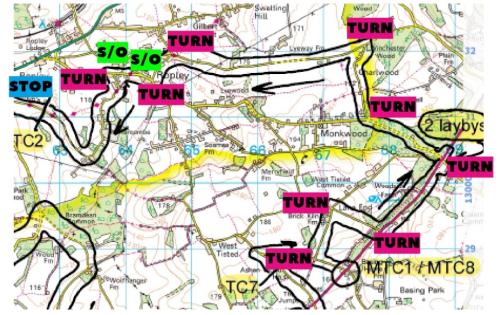
Apologies, the map is a little pixelated – but hopefully you get the drift. What we have is an eleven junction navigation before a first Stop Box pause – something that will fit to my development layout only if we start from the pub or the church… otherwise another junction is needed to get to a stop box. With nine Turns and two Straight-ons, we only use the spine and one loop. So that's food for thought when the Rally Master picks up an unmarked map to start planning.
What we learn from that is a real-world route will transpose onto our track, but we should plan a fresh route on the map with at least half an eye on our SlotNav layout. That also gives us the opportunity to build in the more cryptic navigational puzzles that are well explained in the Percy’s Guide document: http://www.sccon.co.uk/share/pprns/SCCoN...ide_v3.pdf
An Expert crew simply gets a clean map and a sheet of cryptic clues - of which these are for that first leg of the Hampshire event...
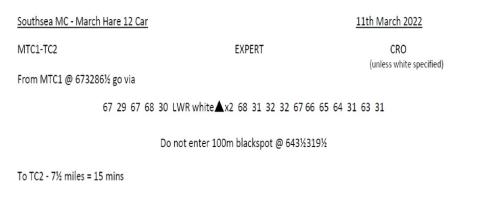
We are a long way off something like that for SlotNav! But it's good to show you the direction of travel.
The sample navigation I used in the previous section was created simply by referring to the track diagram. I planned what I thought would be an interesting route, including some elements – such as repeated ‘Straight-On’ instructions inside the ‘wings’ – that I wanted to check could be suitably adjudicated. And yes, the Race Master will need to keep a close eye on such things! Otherwise, the Stop Boxes identify almost all navigational errors.
This simple way of route-planning is perfectly excellent – especially for a beginners’ event. A whole event could be created with a long string of Turn / Don’t Turn instructions planned entirely from the track diagram – or by running the layout and recording junction instructions via a voice recorder or a human note-taker.
However, to understand how the Rally Master can use a real route, let’s go right back to that Hampshire 12-Car rally I mentioned in the first post. Here is the marked route map that was given to beginner crews that night – the route is made up of the roads enclosed in the thick black lines…
For SlotNav, a marked map is not a navigational instruction suitable for beginners. On a SlotNav layout, simple turn instructions – or maybe even a series of Tulip diagrams – are ideal for people starting out. A Herringbone is a bit more difficult, so that could fall into the Novice route instruction - as does a marked map.
For a SlotNav event, the crew might get the map a minute or two before the start of their run – time to quickly mark the junctions on it. Let’s take the first part of the Hampshire route, from the start – or Main Time Control 1 (MTC1) – to Time Control 2…
You can immediately see some limitations – the direction of a turn at a junction on the map is not going to translate to our track. So any type of turn at a junction will become a ‘Turn’ instruction – and any junction where a turn is not made on the map is a ‘Straight-on’ instruction. This actually makes things slightly more difficult for the driver.
Another thing to note are the tiny roads and tracks that might lead to a farm or to nowhere. These ‘white’ roads are usually ignored on a road rally event and instructions are marked ‘CRO’ – or ‘coloured roads only’. If white roads are to be used, this will be stated clearly. Also, if the type of a junction is unclear, the route instructions could clarify whether it's a turn or straight-on – or the Rally Master can answer any questions before the car sets off.
So, using coloured roads only, here’s that section of the maps marked with SlotNav navigator-driver instructions, emphasised with the digital equivalent of coloured highlighter pen…
Apologies, the map is a little pixelated – but hopefully you get the drift. What we have is an eleven junction navigation before a first Stop Box pause – something that will fit to my development layout only if we start from the pub or the church… otherwise another junction is needed to get to a stop box. With nine Turns and two Straight-ons, we only use the spine and one loop. So that's food for thought when the Rally Master picks up an unmarked map to start planning.
What we learn from that is a real-world route will transpose onto our track, but we should plan a fresh route on the map with at least half an eye on our SlotNav layout. That also gives us the opportunity to build in the more cryptic navigational puzzles that are well explained in the Percy’s Guide document: http://www.sccon.co.uk/share/pprns/SCCoN...ide_v3.pdf
An Expert crew simply gets a clean map and a sheet of cryptic clues - of which these are for that first leg of the Hampshire event...
We are a long way off something like that for SlotNav! But it's good to show you the direction of travel.
![[+]](https://slotracer.online/community/images/bootbb/collapse_collapsed.png)