

16th-Feb-22, 01:08 PM
I have a nice GT format for the Magic app which I'll share in a separate thread soon (I promise!). But to try and answer your two questions...
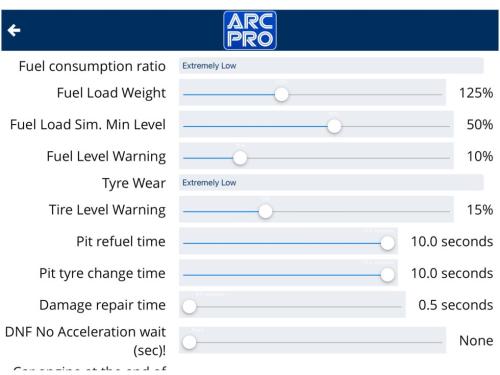
1) pitting too often. To stretch out the time between pit stops, you need to find the 'General Configuration' menu and scroll down to 'Fuel consumption ratio' and 'Tyre wear'. For the longest possible stints, you choose the 'extremely low' option - or experiment with the others...
2) slow speed when need to pit. I'm pretty sure this is automatic - it can't be turned on or off - but you will need to set a low speed for each car in the 'calibration' process for it to be noticeable. This is the same as the Scalextric app, although it is easy to miss. You find the calibrate button in the 'Prepare for Race' screen...

The other cool thing about that screen is that you can ID the car's chip with just a click of a button in the software rather than on the powerbase.
I hope that answers your two questions - and I'll see if I can get that GT simulation posted later today. It has been on my to-do list for months...
1) pitting too often. To stretch out the time between pit stops, you need to find the 'General Configuration' menu and scroll down to 'Fuel consumption ratio' and 'Tyre wear'. For the longest possible stints, you choose the 'extremely low' option - or experiment with the others...
2) slow speed when need to pit. I'm pretty sure this is automatic - it can't be turned on or off - but you will need to set a low speed for each car in the 'calibration' process for it to be noticeable. This is the same as the Scalextric app, although it is easy to miss. You find the calibrate button in the 'Prepare for Race' screen...
The other cool thing about that screen is that you can ID the car's chip with just a click of a button in the software rather than on the powerbase.
I hope that answers your two questions - and I'll see if I can get that GT simulation posted later today. It has been on my to-do list for months...
![[+]](https://slotracer.online/community/images/bootbb/collapse_collapsed.png)