As of update
1.99.1:
All kinds of fixes to the
tools and
options for Widgets.
Some updated visual styles to make the app more cohesive.
Improved the
speed and
handling of the
Layout Editor.
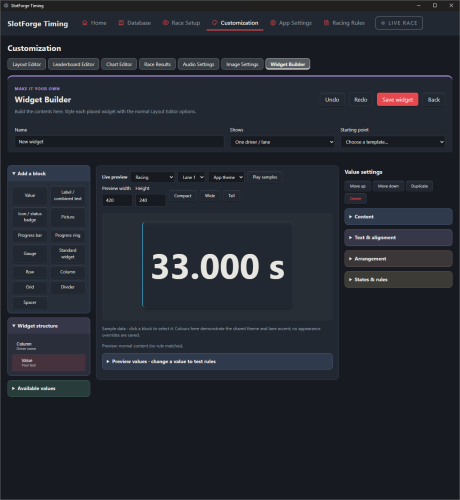
Small upgrade to the
Widget Builder, you can now drag and resize values how and where you want.
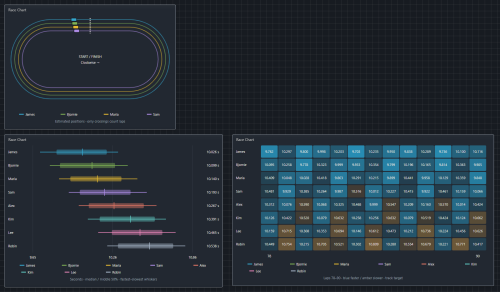
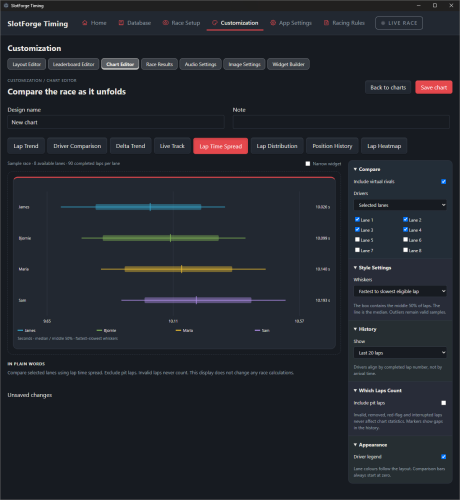
Some new
Chart Widgets - also a
Live Tracker, which estimates your position on track based on laptimes. Not really useful for anything other than maybe the Virtual Rival or just because it looks kinda cool!
Phidget Support - Do you use Phidgets as your Timing Hardware? I hope it works with app now :)
Virtual Rival - Replay your recorded laps on one lane, race yourself or rival on the other lane. Virtually, so no car on track. Won the challenge? Up the pace of your Virtual Rival :)
Multi-Class Racing - Slotcars can be given a class, like GT3 or Group C. You can enable multi-class racing for Heats and championships and have each class on track and count points separately. a Race in a Race!
Resource System - Aimed at Endurance or Championships, Heats or Season, you can now allocate tyres for a single race or the entire set of races.
Tyre Temperature - An expansion of the Tyre Wear system, you can now factor in Tyre Temperature if you want.
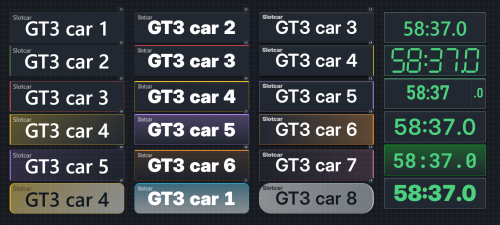
Different Fonts for Widgets - Want better fonts for your widgets? Select from a few options within the app or use your own!
Race Clock - Three different standard designs to choose from, Original, Digital and a more Detailed one!
I'm also exploring the possibility of a Windows XP '
Bridge' app. This would capture inputs from legacy ports/operating systems and broadcast those over WiFi/Local LAN. You will need Internet Access on the old computer and you will need a second computer, running W7 or preferably W10/W11, using the SlotForge Timing app. You'd just aim the Main App to the Bridge App's IP address, hit connect, and all lapdata would be sent to the Main app.
Download here:
SlotForge Timing App - Direct Download from Google Drive, source or pre-installed!
GitHub - Alternative Download
I want to express again; I'm still really looking for
user feedback on this. What worked for you, what didn't work? Where did you look and expect features to be but didn't find them, missing customization, did you want something but the app didn't give you the option, what's missing? tell me about it! :)



