Thread Rating:
  • 0 Vote(s) - 0 Average
  • 1
  • 2
  • 3
  • 4
  • 5

SlotForge Timing - (TrackMate) Slotcar Timing Software
#11

Not really, I can probably fix that no problem! :)

What Timing Hardware do you have? Which setup did you choose in RC? :)

Edit: I've dug around, I assume the Timing Hardware is custom built, it doesn't use like a small computer or anything?
It's the Parallel Port setting in RC I believe.

I'll do my research and get back to you, I'll probably have something tomorrow :)
Edit2: Well it's gonna take a bit longer, might be somewhere next week :/ I'll PM you when it's ready, sorry for the trouble and the time it's taking..
Quote
#12

Yes, timing hardware is home made  - simple light bridge and photo sensors set into track. Run through parallel port on ancient laptop running Windows XP which is never connected to the internet. 

RC version is also ancient 1.11.5 I think. I am not alone, loads of people use similar set ups. An RMS uses a tiny fraction of a computer's resources so a state of the art one is not necessary.

I installed this more than ten years ago and work on the basis " if it ain't broke why fix it?"  Always happy to look at other systems though to see if improvements are available.
Quote
#13

Yes, this will probably use more resources on your computer because it's shiny ;-)

I've checked it while running a simulated race:
0-5% CPU usage, and about 1GB of RAM - Desktop PC
2-5% CPU usage and about 1.5GB of RAM - Laptop

My devices are kinda modern though, the bigger RAM usage on laptop is due to me having added more images in the Slotcar and Driver database. All in all, not that bad I think.

I am most likely of a younger generation but I agree with the statement, however I just like something that looks visually nice and the pride and joy of this app is basically the Slotcar Database for me :) It's what started it and all the other things that came to life in this app are more out of curiosity whether it would be possible :)

Still lots to do, but the core ideas and concepts are in, they just need fine-tuning :) I'll let you know when Parallel Port is in! Yes
Quote
#14

Guys, a big update, version 1.99.0 - What's new?
  • Lots of UI Improvements to make things more clear and easier to understand.
  • Lots of rewrites on how Race Systems work!

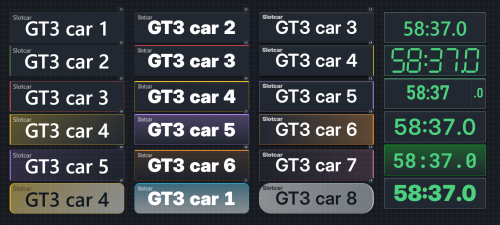
  • Refined Widget Controls and lots of New Settings! Gradient Backgrounds, Accent Stripes, Race-State Colour options and more!

  • Parallel Port Support by request, not yet verified working.

  • Pitstops on a Timer! What's the point of that you ask? You can now define a pitstop that takes 30 seconds for example. During this time, you can REMOVE your car from the track, roll some sticky tape against the tyres or do some other magic, and place it back on track within the set time limit. Your pitstop has now become an actual Slotcar Service Pitstop! I don't know if this has been done but I think it's a really cool feature, and actually gives some real life tactical feeling to a pitstop. Taping your tires is like actually fitting new tyres in real life giving you a few laps worth of advantage. Setting an universal timer gives everyone equal chance. You can even expand this to 3 minutes for example, so you could actually change tyres during an endurance race, or just for the fun of it. Put on some slippery tyres to match the simulated Wet Weather conditions? Sounds like fun!
  • If chosen and turned on, penalties will now always be additive to a pitstop time. Did you deserve a 10 second stop and go penalty? Your pitstop time now becomes 40 seconds (example from above, 30s + 10s). I think this adds a bit of tactical depth on when and where to pit during a race!

  • Championships - Had a Free Practice and Qualifying set up but don't feel like driving them? You can now choose to skip them!
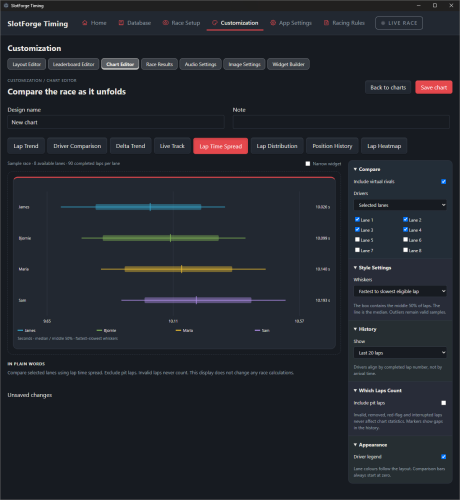
  • Chart Widgets - compare laps in different ways using bar or line graphs!
  • All-in-One Widgets - For the less tech savvy or impatient among us, a few clicks gives you a complete layout with all the essential info!
  • Calculations Page - This page displays all the calculations that are being used by the Racing Systems and allows you to change them. Is something calculated over Median Laptime and would you rather it did that over Average Laptime or even Current Laptime? This is where you do it!
  • Race Results Page - The Main Display gets the Finalize Results page, where the Race Director can disqualify drivers, invalidate laps and whatnot. the Second Screen gets the Race Results, showing the results and each driver's top statistics. You can do some light customization for now, choose between a 'Card' display or design your own row leaderboard with the Leaderboard Editor.
  • Revised Audio Calls Setup! - More than +90 Call options and +35 'Ambient Sound' settings to choose from! Edit them to say what you want or create your own calls using the variables the app itself uses! Save as a set, apply on the Race Setup you want.
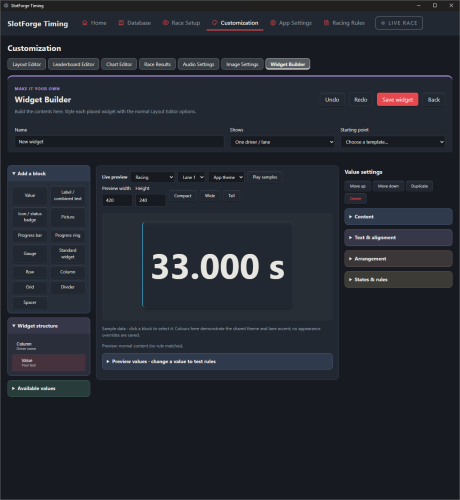
  • Revised Widget Builder - Complete redesign of the Widget builder's functionality and User Interface, it's become a lot more powerful to truly build what you want along with a live preview of what you are making!
                   

Just download the pre-installed Windows zipfile, double click the icon after unzipping and enjoy!

Download here:
SlotForge Timing App - Direct Download from Google Drive, source or pre-installed!
[+] 2 members Like theDutchmanJames's post
Quote
#15

As of update 1.99.1:

All kinds of fixes to the tools and options for Widgets.
Some updated visual styles to make the app more cohesive.
Improved the speed and handling of the Layout Editor.
Small upgrade to the Widget Builder, you can now drag and resize values how and where you want.
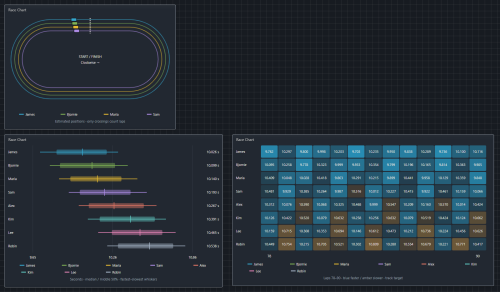
Some new Chart Widgets - also a Live Tracker, which estimates your position on track based on laptimes. Not really useful for anything other than maybe the Virtual Rival or just because it looks kinda cool!

Phidget Support - Do you use Phidgets as your Timing Hardware? I hope it works with app now :)

Virtual Rival - Replay your recorded laps on one lane, race yourself or rival on the other lane. Virtually, so no car on track. Won the challenge? Up the pace of your Virtual Rival :)
Multi-Class Racing - Slotcars can be given a class, like GT3 or Group C. You can enable multi-class racing for Heats and championships and have each class on track and count points separately. a Race in a Race!
Resource System - Aimed at Endurance or Championships, Heats or Season, you can now allocate tyres for a single race or the entire set of races.
Tyre Temperature - An expansion of the Tyre Wear system, you can now factor in Tyre Temperature if you want.

Different Fonts for Widgets - Want better fonts for your widgets? Select from a few options within the app or use your own!
Race Clock - Three different standard designs to choose from, Original, Digital and a more Detailed one!

I'm also exploring the possibility of a Windows XP 'Bridge' app. This would capture inputs from legacy ports/operating systems and broadcast those over WiFi/Local LAN. You will need Internet Access on the old computer and you will need a second computer, running W7 or preferably W10/W11, using the SlotForge Timing app. You'd just aim the Main App to the Bridge App's IP address, hit connect, and all lapdata would be sent to the Main app.
               

Download here:
SlotForge Timing App - Direct Download from Google Drive, source or pre-installed!
GitHub - Alternative Download

I want to express again; I'm still really looking for user feedback on this. What worked for you, what didn't work? Where did you look and expect features to be but didn't find them, missing customization, did you want something but the app didn't give you the option, what's missing? tell me about it! :)

Quote


Possibly Related Threads...
Thread / Author Replies Views Last Post
Last Post by Steve-S
31st-Oct-21, 07:15 AM
Last Post by slotloco
15th-Jan-21, 07:51 PM

Forum Jump:


Users browsing this thread: 2 Guest(s)