

10th-May-23, 10:19 AM
Interesting article on the Geekdetour webpage.
https://geekdetour.com/3d-printing/blobs...e-problem/
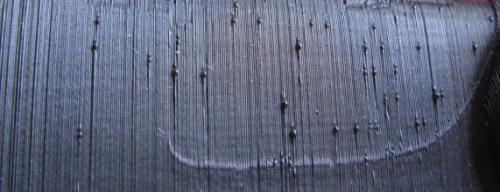
For those of us using SD cards in the printer to print from, then by default most printers will periodically dump information during printing back on to the SD card. Depending on a number of factors, i.e. the model complexity, printer processing power, SD card write times etc, the printer can actually pause in printing and allow a blob to form on the part. This was noticeable on complex bodyshells where a random blob would appear every few layers.
Adding the G code from the GeekDetour website, to the Start G code (for Cura, select printer then Machine settings and cut & paste the code in)
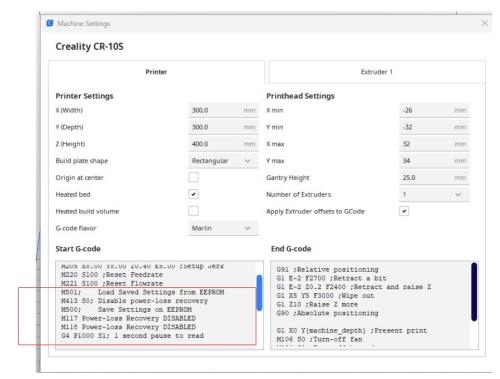
Added code in red box turns off the write cycle.
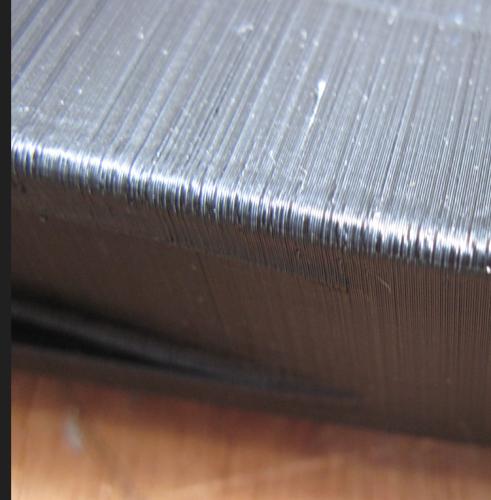
Here is another body after doing this and the blobs are gone.
Enjoy
John.
https://geekdetour.com/3d-printing/blobs...e-problem/
For those of us using SD cards in the printer to print from, then by default most printers will periodically dump information during printing back on to the SD card. Depending on a number of factors, i.e. the model complexity, printer processing power, SD card write times etc, the printer can actually pause in printing and allow a blob to form on the part. This was noticeable on complex bodyshells where a random blob would appear every few layers.
Adding the G code from the GeekDetour website, to the Start G code (for Cura, select printer then Machine settings and cut & paste the code in)
Added code in red box turns off the write cycle.
Here is another body after doing this and the blobs are gone.
Enjoy
John.
Mr Fit for Function.
![[+]](https://slotracer.online/community/images/bootbb/collapse_collapsed.png)


