Batch-Save Track Libraries
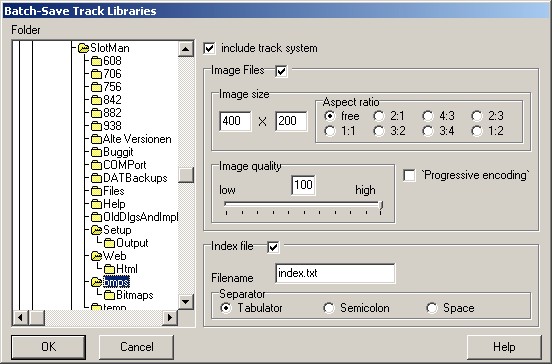
This dialog saves each layout to a Track Library File automatically (one layout per file). Optionally an image of each layout can be generated and saved as a JPG-file. There is an option for creating a text file also. This file contains information about the layouts. More information about track libraries can be found here1TRJ4VN.
Select the folder to save the files in on the left side of the dialog. Note that only folders on the same volume that SlotMan has been installed to can be used. It is also important that the files being written may overwrite files sharing the same name.
On the right side of the dialog you can setup options for the generation of image files. The aspect-option can be used to setup some frequently used image aspects or to enforce a “free” aspect.
• Image quality: The larger this number, the better the images will look like (but the more disk space will be needed to store them.
• ‚Progressive encoding‘: This option is used to determine if the file will be loaded from top to bottom or in it´s original size but in bad quality. The image is being enhanced while it is loaded. Note that not every imaging-software is able to handle image files stored with this option on.
0 If you choose to create a text file containing some information about the layouts as well, check the option “Index file”. In addition you have to provide a filename for this text file.
1 The configured separator is used to specify how the fields are to be separated from each other.
2 The information provided is:
3 Layout name, Number of lanes, Space needed, average lane length and lap record.
Start the export by clicking “OK”. Click “Cancel” to close the dialog without exporting the layouts.
Created with the Personal Edition of HelpNDoc: Qt Help documentation made easy