Controllers
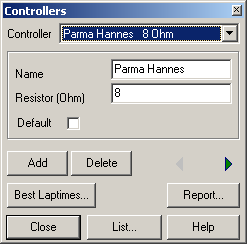
The administration of drivers is similar to the management of CarsNQ95BK.
If the parameters have been set, the controller´s description can be saved using the “Add”-button. Parameters are changed by going to the previous or next description (“<” or “>”), using the list or report or by closing the dialog (“Close”).
Clicking the “Best Laptimes”-button starts the dialog for analysing the Best laptimes10KJFMO and filters the lap times using the current controller description.
Use “Delete” to remove a description and all of it´s associated lap times etc.
Report
Opens the ReportOEEVSP dialog to output reports to the printer or a file.
Created with the Personal Edition of HelpNDoc: What is a Help Authoring tool?