Pausing a Race
KPausing a Race
Use the Race | Pause menuRace Menu command or the Spacebar to pause the currently running race. When the Pause command is issued the Race Paused window will be opened and displayed on the desktop.
This window will display the race name, the drivers and cars in the race and the type of race to being run.
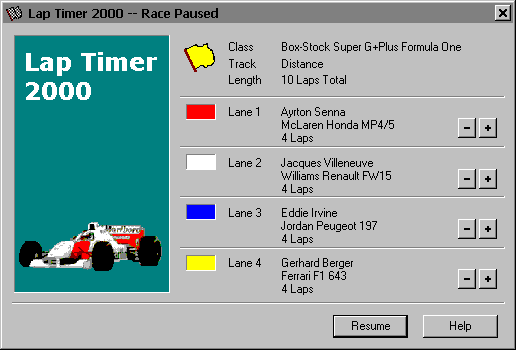
Laps completed while racing is paused will not be recorded. Timed races will suspend the race timer until racing is resumed.
The Pause command can be used for track calls and red flag situations. Before resuming the race, reposition the cars as per the race directors instructions, and then press the Resume button described below to continue the current race.
The race director can also use this window to adjust individual racers lap counts using the [ - ] and [ + ] buttons located off to the right of each racers lane.
K[ - ]
Press this button to reduce the lap count for the respective racer.
K[ + ]
Press this button to increase the lap count for the respective racer.
KResume
Press this button to resume the currently running race.
KHelp
Press this button to open the Lap Timer Help Window and go directly to the Pausing a Race topic.
Created with the Personal Edition of HelpNDoc: What is a Help Authoring tool?