Lane Rotation
KRotating Lanes
Use the Race | Rotate Lanes menuRace Menu command to manually advance drivers to the next lane for heat racing.
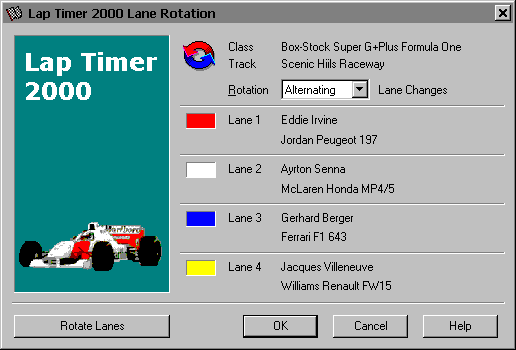
Lap Timer 2000 provides two methods of rotating lanes. Use the Rotation drop list to select the type of lane rotation you would like to use.
KSequential Lane Changes simply advance each driver to the next highest lane number. The driver currently in the highest lane is moved back to lane 1.
The table below illustrates the sequential order of movement on a 4-lane raceway.
Lane 1 A D C B
Lane 2 B A D C
Lane 3 C B A D
Lane 4 D C B A
In the example above Driver “A” starts the race in Lane 1 for the first heat, and advances to Lane 2 for the second, Lane 3 for the third heat and so on. The Driver in Lane 4 always starts the next heat in Lane 1.
KAlternating Lane Changes advance each driver to a different lane in the upcoming heat so that they are no longer running next to the same drivers as they did previously. This is particularly useful when the driver on an inside lane attempts to knock a competing driver out of the outer lane next to him.
The table below illustrates the alternating order of movement on a 4-Lane Raceway.
Lane 1 A C D B
Lane 2 B A C D
Lane 3 C D B A
Lane 4 D B A C
In the example above Driver “A” starts the race in Lane 1 for the first heat, and advances to Lane 2 for the second, Lane 4 for the third heat and Lane 3 for the final heat. Driver “B” starts in Lane 2, but moves to Lane 4 for the second heat, Lane 3 for the third heat and ends up in Lane 1 for the final heat.
The table below illustrates the alternating order of movement on a 3-Lane Raceway.
Lane 1 A C B
Lane 2 B A C
Lane 3 C B A
With only 3 lanes it is mathematically impossible to always be next to a different driver in each heat, but for the most part individual heats will have alternating drivers in most cases.
Alternating lane rotations are exactly the same as Sequential rotations on a 2-Lane Raceway.
Lane 1 A B
Lane 2 B A
Note You must press the [Rotate Lanes] button described below to actually advance drivers from one lane to the next.
KRotate Lanes
Press this button to move drivers to the next lane in the specified rotation.
KOK
Press this button to accept the lane rotation changes that you’ve made. You must use the [Rotate Lanes] button prior to pressing the [OK] button to actually advance racers to the next lane for heat racing.
KCancel
Press this button to cancel lane rotation changes and retain the current lane ordering.
KHelp
Press this button to open the Lap Timer Help Window and go directly to the Lane Rotation topic.
Created with the Personal Edition of HelpNDoc: Easily create EBooks