Spare Parts
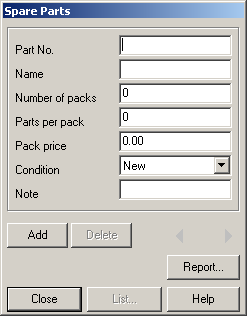
This dialog can be used to manage the spare parts you own. This information is not being used in any other part of SlotMan and are only meant to be a simple possibility to manage parts.
Parts can be added by filling the text fields and clicking “Add”. Stored parts can be updated by altering information and changing to another part description (by clicking “<” or “>” or displaying the list of existing descriptions) or by closing the dialog.
Pressing “<” when editing the first description, the editor is cleared and a new part may be added (which can also be done by pressing (“Add”).
Report
Opens the ReportOEEVSP dialog to output reports to the printer or a file.
Created with the Personal Edition of HelpNDoc: Easy CHM and documentation editor