Language Configuration
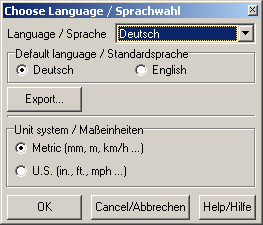
Use this dialog to select your preferred language and unit settings.
Language
Select your language from this list. SlotMan supports the english and german language without the use of language files.
If you´d like to use another language, the corresponding language file must exist in SlotMan´s program folder. This language is then added to this list.
To translate the software to another language one of the existing language files should be downloaded from www.slotcarmanager.de and translated. This can be done by using a simple text editor. The procedure of translation is described in the language file itself.
Default language
The default language is only used for upgrading language files from older Slotman-versions (see Export below).
Export...
This function exports the current language to a textfile (the language file). This language file may then be translated. This functionality should be used if there´s already a language file for an older Slotman-version. Most text don´t have to be translated again. This function just adds the new messages to the old file using the currently chosen default language.
Unit System
Choose your preferred unit system here. Please note that all length data are stored in the metric system internally. So some inaccuracies may occur when using the US system.
OK
The changes made are saved to the Windows registry and are available immediately. SlotMan does not have to be restarted for changes to take effect.
Cancel
All changes made are ignored and the dialog is being closed.
Created with the Personal Edition of HelpNDoc: Produce online help for Qt applications