Section List
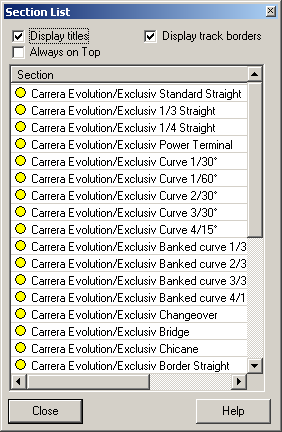
In this dialog the number of available sections can be monitored while editing the layout.
The following information is displayed:
• Number of unused sections
• Number of used sections
• Total number of sections
• Number of missing sections
The circle at the beginning of the row can have the following colours:
• Green: There are additional sections available for this type.
• Yellow: All available sections of the specified type are used.
• Rot: There have been more sections of the specified type used than are available. In this case the column of unused sections will display a negative number (sections needed for this layout). Apart from that a red circle will be displayed on the bottom left of the main window.
The option “Display titles” adds or removes the column headers. This can be used to reduce the width of the dialog.
The option “Show track borders” can be used to add the border sections to the list.
If the “Always on Top” option is checked, the dialog always floats above the main window. Turn it off to allow the main window to overlap this dialog.
The number of currently available track sections can be entered at the track system configuration dialog.
#Change entries in the list of the fastest laps
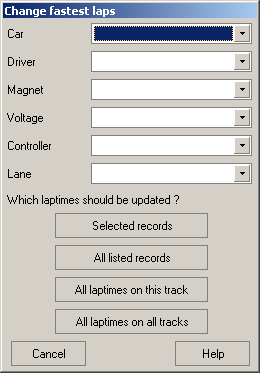
This dialog is used for updating information about the entries of the list of fastest laps. Only those columns are altered for which a value in the corresponding selection box is given.
If a selection box is left blank, the corresponding column stays untouched.
You can choose wether to change only the currently selected rows, all rows of the current list, all laptimes on this track or all laptimes on all tracks.
Created with the Personal Edition of HelpNDoc: Free EBook and documentation generator